TiviMate 8K Pro, also searched as TiviMate 8K or 8K TiviMate, sounds like a premium edition of the TiviMate app. The evidence says otherwise. We checked the developer’s Google Play page and read a seller’s setup instructions on 27 November 2026. We did not install the app, so this guide describes what those sources show, not how the app behaves.
What is TiviMate 8K Pro?
It is an IPTV player app distributed by IPTV sellers under the TiviMate name. The Google Play developer page for Armobsoft FZE, who make TiviMate, lists two apps only: TiviMate IPTV Player and TiviMate Companion. A UK Google Play search for the name returns those two and a set of apps from other developers with similar names, but no TiviMate 8K Pro from Armobsoft FZE.
The app’s own setup material makes the difference clear. One Canadian IPTV seller’s Google TV setup guide for “Tivimate 8K Pro” has the buyer install the Downloader app, type a numeric code, allow installs from unknown sources, then open the app, select a playlist type labelled “TiviMate 8K PRO CLOUD” and enter the username and password from the seller’s activation email. Other seller sites present the same name as the app for a service called Strong 8K. We are not repeating the code here, because it installs software whose developer we could not identify.
Is TiviMate 8K Pro the same as TiviMate?
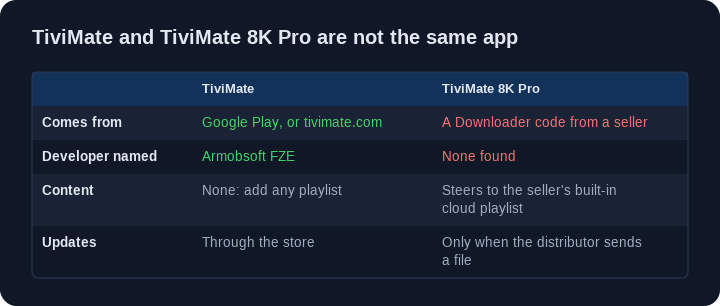
No, on every point that can be checked:
- Where it comes from. TiviMate is on Google Play, or the developer’s own site for Fire TV. TiviMate 8K Pro arrives through a code from a seller.
- Who makes it. TiviMate names its developer, Armobsoft FZE. We found no developer named for TiviMate 8K Pro in the material we read.
- What it plays. TiviMate plays any playlist you add and ships no content. TiviMate 8K Pro’s guide steers you to the seller’s built-in cloud playlist.
- Updates. TiviMate updates through the store. A sideloaded app updates only when its distributor sends a new file.
Whether it is a rebuilt TiviMate or a different player with TiviMate’s name, we cannot say from the outside, and nobody selling it says either. For the other borrowed name, see our guide to what TiviMate Pro really means.
What does the 8K in the name mean?
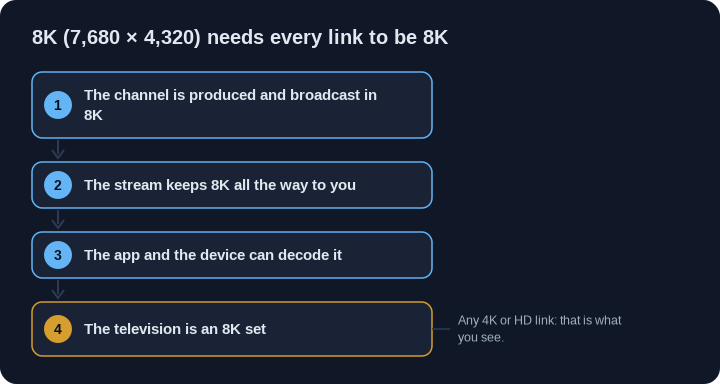
8K is a picture size: 7,680 by 4,320 pixels, the larger of the two ultra-high-definition formats in the ITU’s BT.2020 recommendation. To see it, every link has to be 8K: a channel broadcast in 8K, a stream that keeps it, an app and device that can decode it, and an 8K television. If any link is 4K or HD, that is what you see, and an app’s name cannot add pixels the channel does not carry. Treat the 8K as branding.
What are the risks of installing it?
- Unknown software. Allowing installs from unknown sources for an app with no named developer means trusting a file you cannot check.
- Tied to one seller. If the app is built around one seller’s cloud playlist, changing service may mean changing app, and losing your setup.
- No store protection. No Google Play listing means no store review of the app and no store refund route.
- Name confusion. Problems with it go to the seller, not to Armobsoft FZE, who did not make it.
Many of the same sellers market the service as Strong 8K. The Strong 8K IPTV seller comparison on tivimate.me sets out who sells that name and on what terms.
What is the safer way to get the same result?
Install the official TiviMate from Google Play, add your provider’s playlist as Xtream Codes or M3U, and buy Premium inside the app if you want its extra features; our guide to whether TiviMate is free explains what Premium adds. Any honest IPTV service will give you a login that works there.
Tivimate, the company behind this site, is one of those services for the UK. We are independent, not the developer of the TiviMate app, and we do not hand out a modified player: our login goes into the official app. Streams include 4K on selected channels, not 8K. You can check that on your own TV with a free trial of Tivimate, and the plans from £15 are prepaid with no contract. If you use another player for some channels, our TiviMate external player guide shows how to set it.