Search for TiviMate Pro and you will find download pages, “Pro” apps in the Play Store with almost the same name, and plenty of people asking whether it is the same app. It is a fair question, because the name sounds official. This guide checks it against the developer’s own Google Play page, as it stood on 27 November 2026.
Is TiviMate Pro the same as TiviMate?
Not as a separate product. The Google Play developer page for Armobsoft FZE lists exactly two apps: TiviMate IPTV Player and TiviMate Companion. There is no app called TiviMate Pro from that developer. The paid tier inside the official app is called Premium; the TiviMate listing refers to it as a “paid subscription or premium upgrade”.
So when someone says TiviMate Pro, they mean one of three different things:
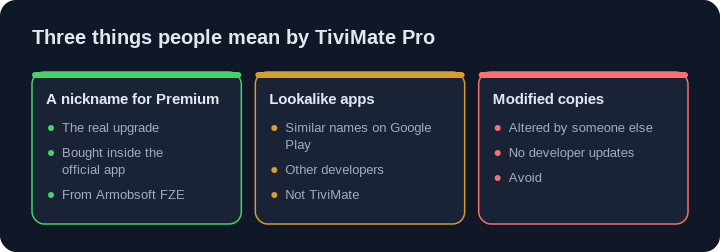
- Premium, by another name. Many people say Pro when they mean the paid version of the real app. If that is what you want, the answer is simple: install TiviMate and buy Premium in it.
- Apps with a similar name from other developers. A UK Google Play search on 27 November 2026 returned, among others, TiviMato Player Pro and IPTV TvMate Player Pro, both listed under HFR Tech LLC. They are different apps by a different company; whatever they do, they are not TiviMate.
- Modified copies. Files shared online as TiviMate Pro, often with claims that Premium is already included. These are the official app altered by someone else.
Is there a TiviMate Pro free version?
The free version that exists is the official TiviMate itself, which is free to install and plays a playlist with its TV guide. Anything offered as “Pro, free” is either that same free app under another name or a modified copy. We do not link to modified copies or explain how to install them, for three practical reasons:
- They come from whoever uploaded them, not from the developer, so they can contain anything, including software you would never knowingly install.
- They get no updates through Google Play, so fixes and new versions never reach them.
- They can stop working at any time, taking your playlists and settings with them.
What Premium adds, and how to see its price in pounds before paying, is in our guide to whether TiviMate is free.
How do you check you have the real TiviMate?
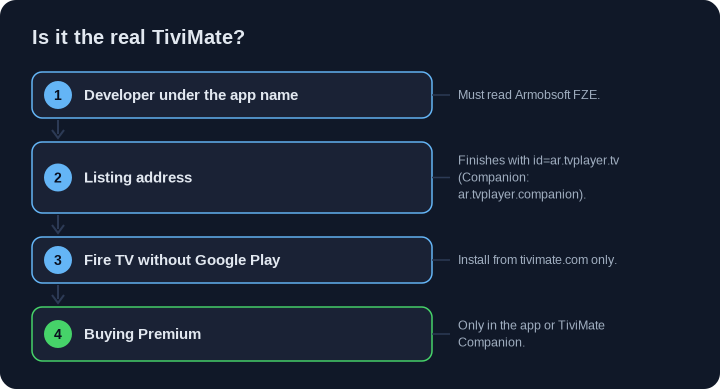
- On Google Play, look under the app’s name: the developer should read Armobsoft FZE.
- Check the address of the listing: the official app’s finishes with
id=ar.tvplayer.tv, and Companion’s withid=ar.tvplayer.companion. - On a Fire TV, which has no Google Play, install from the developer’s website, tivimate.com, not from a file someone else hosts.
- Buy Premium only inside the app or in TiviMate Companion, never through a website selling a “Pro key”.
Is TiviMate 8K Pro the same thing?
No. TiviMate 8K Pro is a different app again, handed out by IPTV sellers rather than published on Google Play by Armobsoft FZE. It needs its own explanation, which is in our guide to what TiviMate 8K Pro is and who makes it.
Does Premium or Pro include channels?
Neither does. The developer’s listing says that any paid upgrade “unlocks application features only; it does not include, or provide access to, any channels, streams, or media content.” Channels come from an IPTV subscription you add as a playlist. Tivimate, the company behind this site, sells one for the UK; we are independent and not the developer of the TiviMate app. Our login works in the official TiviMate, free or Premium, and you can try it free for 24 hours or read how a Tivimate subscription works first.
Frequently asked questions
Is TiviMate safe?
The official app from Armobsoft FZE on Google Play is an ordinary Play Store app, updated through the store like any other. The risk comes from copies installed from elsewhere under names like TiviMate Pro, which get no updates from the developer and can contain anything. Install TiviMate from Google Play, or on a Fire TV from the developer's own website.
Is TiviMate legit?
TiviMate itself is a legitimate media player: it is published on Google Play by a named developer, Armobsoft FZE, and contains no channels. What you watch in it depends on the playlist you add, so the question that matters is whether the IPTV service you load into it is one you trust.