The message usually reads something like HttpDataSource$HttpDataSourceException, sometimes followed by a reason and a number. It looks alarming, but it is the most honest error TiviMate shows, because it tells you which part of playback failed. This guide translates the data source exception and its two relatives, the codec exception and the parser exception, using Google’s own documentation for the classes in the message.
What is the TiviMate HttpDataSource exception?
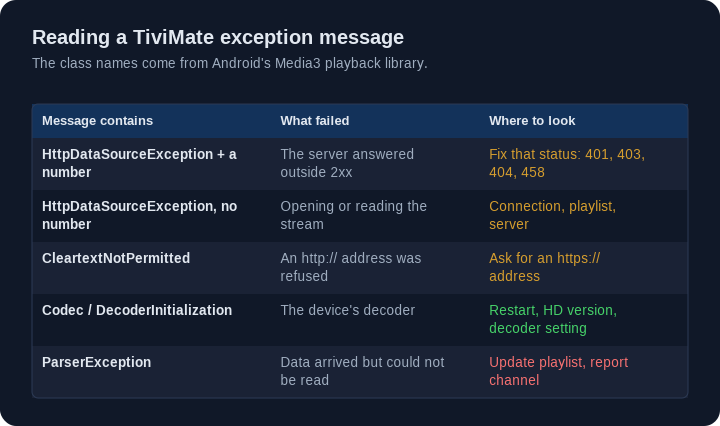
The words in the message are class names from Media3, Android’s library for audio and video playback and the successor to ExoPlayer. TiviMate’s developer, Armobsoft FZE, does not document the app’s internals, but the names match Media3 exactly. Google’s reference page for HttpDataSourceException describes it as the error for a failure in opening or reading from an HTTP data source, which is the connection that downloads the stream.
That page also lists the more specific errors that share the name. Three matter for IPTV:
- InvalidResponseCodeException. Google says it is “thrown when an attempt to open a connection results in a response code not in the 2xx range”, and the class carries the code itself. This is the version that ends with a number.
- CleartextNotPermittedException. “Thrown when cleartext HTTP traffic is not permitted”, according to its reference page. The device or app refused an unencrypted http:// address.
- InvalidContentTypeException. The server answered, but with something that is not a stream, such as a web page.
What if the message ends with a number?
Then the exception is only the envelope and the number is the letter inside. Fix the status, not the exception:
- 401 or 403: the login was rejected or refused; see TiviMate error 401, 403 and 429.
- 404: the channel address no longer exists. Update the playlist; if the channel is still missing, it was removed.
- 458 or 456: provider-specific numbers; see TiviMate error 458.
- 511: a Wi-Fi sign-in page or the provider’s own refusal; see TiviMate error 511.
- 5xx: the server failed. Wait and report it if it lasts; the TiviMate error codes overview on tivimate.me lists each one.
How do you fix it when there is no number?
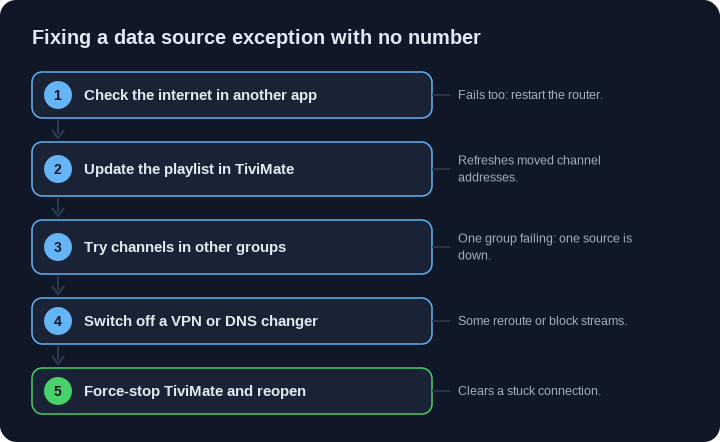
No number means the connection broke before the server could answer. Work through these in order:
- Check the internet on the device. Open another streaming app. If that fails too, restart the router.
- Update the playlist. In TiviMate’s playlist settings, update or refresh it so the channel addresses are current.
- Try channels in other groups. One failing group points at one source being down at the provider.
- Switch off a VPN or DNS changer. Some block or reroute the stream addresses.
- Check the server address. If it starts with http:// and the message mentions cleartext, ask the provider whether an https:// address exists.
- Restart TiviMate properly. Force-stop it in the device’s app settings, then open it again.
What is the TiviMate codec exception?
A codec exception is not a network problem. The stream arrived, but the device could not start or keep running the decoder that turns it into a picture. Media3’s DecoderInitializationException is “thrown when a failure occurs instantiating a decoder.” That can happen when the decoder is still held by another app, or when the device does not handle the channel’s video format well, which is more likely with a 4K stream on an older stick.
- Restart the device to free the hardware decoder.
- Try the HD version of the channel if your playlist has one.
- In TiviMate’s playback settings, switch the video decoder between hardware and software for that channel. Third-party settings guides place this under Settings, Playback; the wording may differ in your version.
- As a test, open the channel in another player app; our TiviMate external player guide shows how.
What is a parser exception in TiviMate?
Media3’s ParserException is “thrown when an error occurs parsing media data and metadata”, and a related error says the input format was not recognised. In plain words, data arrived but it was not a stream the player could read: often an error page in place of video, a broken segment, or a playlist entry pointing at the wrong kind of file. Update the playlist, try another version of the channel, and report the channel name to the provider if it keeps happening.
If your login comes from Tivimate
Tivimate is an independent IPTV subscription for the UK, not the TiviMate app. If one of our logins shows a data source exception, send Ryan a photo of the full message on WhatsApp; the number at the end, or its absence, tells us where to look. Before buying anything, you can run the free 24-hour trial in TiviMate on the device you will actually use.
Frequently asked questions
How do I fix the TiviMate data source exception quickly?
Read the end of the message first. If it contains a three-digit number such as 401, 403 or 404, fix that status: the login, the account or a moved channel. If there is no number, check the internet connection, update the playlist from its settings and try a second channel. If every channel fails on every device, the provider's server is down.
How do I stop buffering on TiviMate?
Buffering is a different problem from an exception, but it often comes first. Use a wired connection or a stronger Wi-Fi signal, close other heavy downloads, and try a larger buffer size in TiviMate's playback settings, where third-party guides place the option. If it buffers on every channel at busy times, the server is the bottleneck, and only the provider can change that.