
Error code 458, sometimes shown as code 458 or just 458, is one of the most searched TiviMate messages and one of the least explained. Most pages that cover it state a single cause as fact. We could not find any source that defines it for IPTV, so this guide does three things instead: it shows where the number does and does not appear in the standards, sets out what different sources claim, and gives you a way to find out which cause applies to you in a few minutes.
Why is 458 not a normal error code?
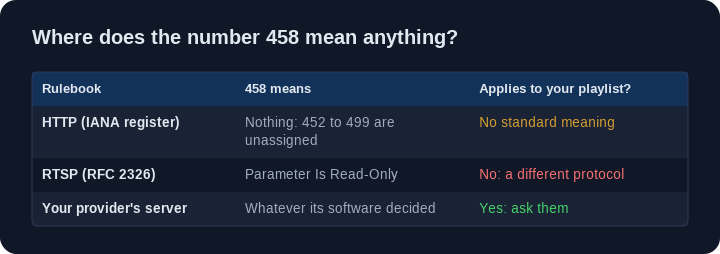
Web servers answer every request with a three-digit status, and the list of official ones is kept by IANA. On the IANA register of HTTP status codes, every number from 452 to 499 is marked unassigned. So 458 has no agreed meaning on the web, unlike 401 or 403.
The number does exist in another protocol. RFC 2326, the original RTSP standard for controlling media streams, defines 458 as “Parameter Is Read-Only”. An IPTV playlist in TiviMate is normally fetched over the web, not over RTSP, so that meaning does not carry over. What you are seeing is a number picked by whoever wrote the provider’s server software.
What do sources say causes TiviMate error 458?
The explanations we found fall into two groups.
- An account refusal. The TiviMate error codes overview on tivimate.me groups 456 and 458 as provider-specific codes most often sent to refuse an account: expired, blocked, or over its connection limit.
- An interrupted connection. VPNCentral’s TiviMate guide describes 458 as an HTTP problem that happens when a long transaction is interrupted, for example when the server cuts a request off.
Neither source cites the server software that sends the code, and they cannot both be the whole story. The honest position is that 458 means what your provider’s system makes it mean. The steps below tell you which group you are in without having to know that in advance.
How do you find out what 458 means for you?
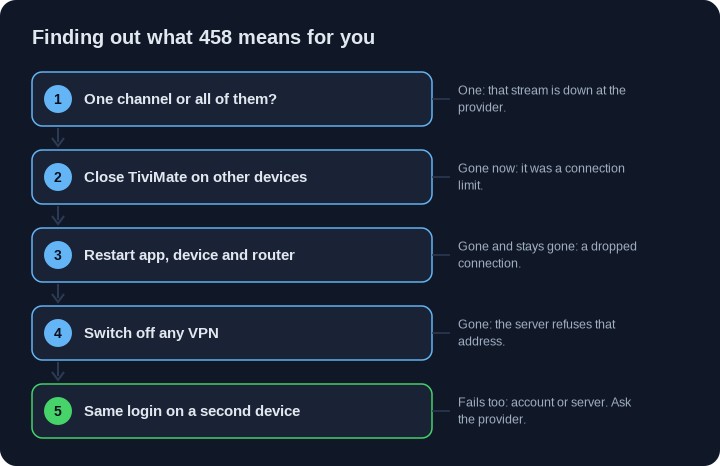
- One channel or all of them? Open three channels from different groups. If only one fails, that stream has a problem at the provider; refresh the playlist in case it moved, and report it if not.
- Close TiviMate everywhere else. If the same login is open on another TV, phone or tablet, close it there, wait a minute, then try again. If 458 disappears, it was a connection limit.
- Restart the chain. Force-stop TiviMate, then restart the device and the router. If the code goes away and stays away, it was a dropped connection.
- Turn off any VPN. A server may refuse a VPN address it does not accept. Test without it.
- Try the login on a second device. If it fails there too, the account or the server is the cause. If it works, the problem is local to the first device.
- Ask the provider. Give them the code, the time and whether it affects one channel or all. They can see on their side which rule sent it.
How does 458 relate to 401, 403 and 456?
If the code changes as you test, that is useful information. A switch to 401 means the login itself is now being rejected, and a 403 means it is recognised but refused; both are explained in our TiviMate error 401, 403 and 429 guide, along with 456, the other non-standard number. A 511 on hotel or public Wi-Fi points at a network sign-in page, covered in TiviMate error 511. And if the message is a long line starting with HttpDataSource, the number is inside it: see the TiviMate data source exception guide.
What should you avoid doing?
- Do not clear TiviMate’s data or reinstall it first; you lose your playlists and the server sends the same code.
- Do not keep retrying every few seconds. Some servers count failed attempts and refuse for longer.
- Do not install a different “fixed” build of TiviMate from an unofficial source. The official app is on Google Play from Armobsoft FZE; a modified copy cannot change what the provider’s server decides.
If your login comes from Tivimate
Tivimate is an independent IPTV subscription for the UK; we are not the developer of the TiviMate app. If you see 458 with one of our logins, message Ryan on WhatsApp with the code and the time, and he will check the connection count and the account dates on our side. Plans are prepaid from £15, and the Tivimate plan prices page lists every device tier, so a household that keeps hitting a connection limit can see what a 2-device plan costs.
Frequently asked questions
Why is TiviMate not working today with error 458?
If 458 appears on every channel and it worked yesterday, the change is almost always on the provider's side: an account limit, an expired plan or a server problem. Check whether another device with the same login fails too. If it does, ask the provider; reinstalling TiviMate will not change a code the server sends.
Should I reinstall TiviMate to fix error 458?
Not as a first step. A reinstall removes your playlists and settings, and the server will send the same code to the new copy. Force-stop the app and restart the device instead, then follow the isolation steps on this page.