
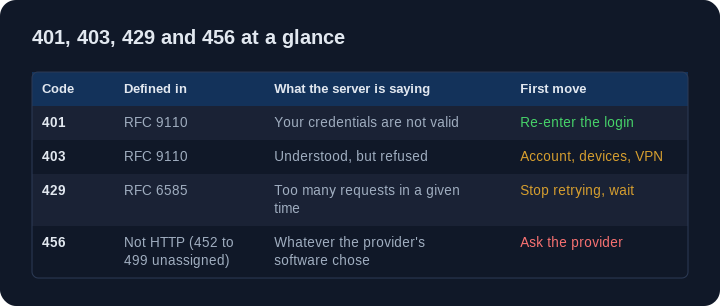
These four numbers all appear when a playlist that used to work suddenly refuses to load. They come from the IPTV server, not from the app: TiviMate, the player made by Armobsoft FZE, shows the status the server sent. Three of them are defined in the web standards, which tells you exactly what the server was trying to say. The fourth, 456, is not, and we say so plainly below.
What does TiviMate error 401 mean?
RFC 9110, the HTTP standard, says 401 means the request “has not been applied because it lacks valid authentication credentials for the target resource.” For an IPTV playlist the credentials are the username and password, and the target is the server address. If any of the three is wrong, the server answers 401.
The usual causes, most likely first:
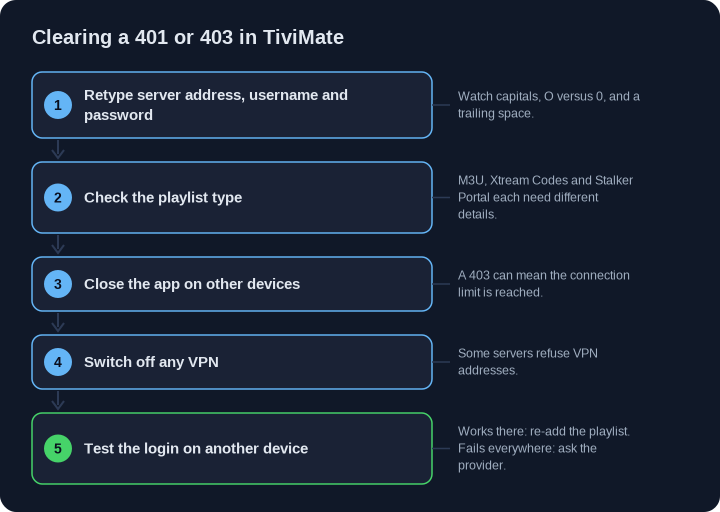
- A typing slip: capital letters, a zero typed as the letter O, or a space at the end of a pasted password.
- The provider changed the server address and the old one is still saved in TiviMate.
- The account was deleted at the end of a trial or a plan, so the details no longer exist on the server.
- The playlist was added as the wrong type. TiviMate’s Google Play listing names three formats, M3U, Xtream Codes and Stalker Portal, and each asks for different details.
What does TiviMate error 403 mean?
RFC 9110 defines 403 as the server having “understood the request but refuses to fulfill it.” The difference from 401 matters: with 403 your details were read, and the answer is still no. On an IPTV server that usually means one of these:
- The account is expired or suspended. The login exists, but its time has run out.
- Too many devices. Every plan has a connection limit, and the next device over it is refused. Close the app on the other screens and try again.
- A VPN or an address the server blocks. Some servers refuse known VPN addresses. Switch the VPN off to test; do not hop locations to get around a block.
- One channel only. If a single channel says 403 and the rest play, that stream is restricted or broken at the provider.
The standard lets a server explain its reason, but players rarely show it, so the provider is the one who can tell you which of these applies.
What does code 429 mean in TiviMate?
429 is “Too Many Requests.” RFC 6585 says it means “the user has sent too many requests in a given amount of time”, which is rate limiting, and that the server may add a Retry-After header saying how long to wait. Fast channel surfing, a guide refresh running at the same time as a playlist update, or an app retrying a dead channel in a loop can all trigger it.
The fix is the opposite of what most people do. Retrying straight away keeps the counter running, so stop, leave TiviMate closed for a few minutes, then open one channel. If 429 comes back on the first try, ask the provider whether their limit has changed.
What is code 456 in TiviMate?
456 is not a web status code. The IANA register lists every number from 452 to 499 as unassigned for HTTP. The number does exist in RTSP, a different streaming protocol, where it means “Header Field Not Valid for Resource”, but an IPTV playlist loaded over the web is not using that meaning. When TiviMate shows 456, the provider’s server software chose the number for its own purposes.
We could not find any provider documentation defining it. The one explanation we found, in a media-server community forum, links it to a usage quota being exceeded, so treat it like a 403: close the app on other devices, wait, and if it stays, ask the provider what their server means by it. The same reasoning applies to the code two numbers up, covered in our TiviMate error 458 guide.
What if the login is right and it still fails?
Test the same details somewhere else. If they work in another player on another device, TiviMate’s saved playlist is the problem: delete it and add it again. If they fail everywhere, the account or the server is the problem, and only the provider can fix it.
A login refused only on hotel or public Wi-Fi is a different fault, explained in TiviMate error 511. A long message that starts with HttpDataSource is covered in the TiviMate data source exception guide, and the TiviMate error codes overview on tivimate.me lists the 5xx server codes too.
If your login comes from Tivimate
Tivimate is an independent IPTV subscription for the UK, not the TiviMate app. Our logins are Xtream Codes details sent on WhatsApp, and plans cover 1 to 4 devices. If one of our logins gives you 401 or 403, message Ryan with the code and he will check the account. New to the service? See how to buy a Tivimate subscription, or start with the Tivimate free trial.
Frequently asked questions
How do I log in to TiviMate again after error 401?
TiviMate has no account of its own for your channels; the login belongs to the playlist. Open the playlist settings, select the playlist and retype the server address, username and password exactly as your provider sent them. If the app will not let you edit them, add the playlist again as a new Xtream Codes playlist and remove the old one.
How do I check my TiviMate account?
There are two different accounts. Your IPTV account, with its end date and connection limit, is held by your provider, so ask them or check the details they sent. Your TiviMate Premium account, if you bought Premium, is managed by the developer through Google Play or the TiviMate Companion app.