You press a channel, the picture never arrives, and TiviMate shows 511, sometimes written as error code 511 or code 511. The number is not TiviMate’s own invention. TiviMate is a player made by Armobsoft FZE, and when a stream request fails it passes on the status the server sent back. We found no list of error codes published by the developer, so this guide works from the web standards that define the number and from what IPTV providers say about it. It covers 511 first and then 521, the code people often mistake for it.
What does TiviMate error 511 mean?
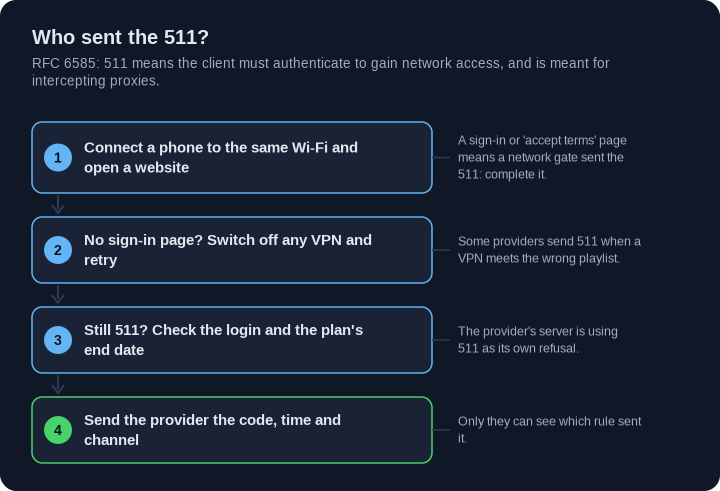
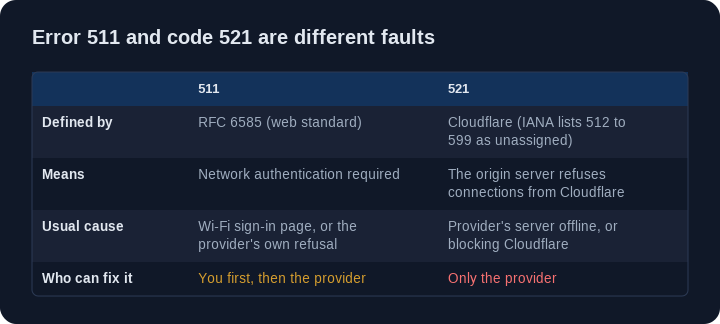
Status 511 is defined in RFC 6585, section 6, and it is listed under that name in the IANA register of HTTP status codes. The standard says it “indicates that the client needs to authenticate to gain network access.” The client here is your TV box or stick. The authentication is not your IPTV username and password: it is the sign-in that a network asks for before it lets you onto the internet at all.
The same section adds that 511 “SHOULD NOT be generated by origin servers; it is intended for use by intercepting proxies.” In plain terms, the code is meant to come from equipment in the middle of the connection, not from the server that holds the channel. Section 6.1 names the usual source: captive portals, the sign-in pages that hotels, cafés, trains and some student or holiday accommodation put in front of their Wi-Fi.
Where does a 511 come from on an IPTV setup?
In practice there are two senders, and working out which one you are dealing with saves a lot of time.
- A network sign-in page. If your device joined a Wi-Fi network that wants you to accept terms or log in, every app that is not a web browser gets refused until you do. TiviMate cannot show you that page, so you only see the number.
- Your IPTV provider’s server. Some providers ignore the standard and send 511 as their own way of saying no. One provider’s help page, for example, says its error 511 appears when a VPN is connected but the normal playlist is still selected, and tells customers to use the playlist it labels for VPN use instead. That is one company’s rule, not a general one, which is why the same code can mean slightly different things from one service to the next.
How do you fix TiviMate error 511?
Work through these checks in order. Each one rules out a cause before you spend time on the next.
- Look for a sign-in page. Connect a phone to the same Wi-Fi and open any website. If a login or “accept terms” page appears, complete it, then try the channel again. At home this is rare; away from home it is the most common cause.
- Check your VPN. If a VPN app is running, switch it off and test. If your provider gives a separate playlist for VPN use, select that one instead. We do not suggest changing the VPN’s location to get past a block.
- Re-enter the login. In TiviMate, open the playlist settings, select the playlist and check the server address, username and password character by character. Menu names can differ between app versions. A space at the end of a pasted password is a common culprit.
- Check the subscription dates. An expired or suspended account is refused at the server. Your provider can tell you the end date if you no longer have it.
- Restart properly. Force-stop TiviMate, then restart the device and the router. The FAQ below explains how.
- Try the login in a second player. If the same details fail in another app on another device, the fault is the account or the server, not TiviMate. Our guide to using an external player with TiviMate names three players you could use for that test.
- Report it. Send your provider the code, the time and one channel name. That is everything they need to look it up on their side.
What is code 521 in TiviMate?
Code 521 looks like a close relative of 511, but it comes from somewhere else. The IANA register lists every number from 512 to 599 as unassigned, so 521 is not a web-standard code at all. It belongs to Cloudflare, a network company that sits in front of many websites and some IPTV servers. Cloudflare’s own documentation says error 521 “occurs when the origin web server refuses connections from Cloudflare”, and names the two most common causes as the server application being offline and Cloudflare’s requests being blocked.
Both causes sit with whoever runs the server. Nothing on your device, your login or your Wi-Fi changes a 521, so the only useful moves are to wait and try again later, and to tell your provider if it lasts.
Does error 511 mean my subscription has ended?
Sometimes, but you cannot tell from the number alone. A server that uses 511 as its own refusal may send it for an expired account, a blocked address or a VPN rule, and the provider decides which. If the sign-in page and VPN checks above change nothing, ask the provider directly rather than guessing.
Other numbers point more clearly at the login. Our guide to TiviMate error 401, 403 and 429 covers wrong details, refused accounts and rate limits; TiviMate error 458 covers a code that is not in any web standard; and the TiviMate data source exception guide explains the long technical message that sometimes carries one of these numbers inside it. For every code on one page, see the TiviMate error codes overview on tivimate.me.
If your login comes from Tivimate
Tivimate is an independent IPTV subscription, not the TiviMate app. If the login in your app is one of ours and you see 511, message Ryan on WhatsApp with the code; support is 24/7, and a person checks the account on our side. If you are still choosing a service, the free 24-hour trial lets you test it on your own TV first, and the Tivimate plans and prices start at £15 for one month, prepaid with no contract.
Frequently asked questions
Is TiviMate down when I see error 511?
Almost certainly not. TiviMate is a player on your own device and does not stream channels itself, so it has no service to go down. A 511 is an answer from a network gate or from your provider's server. If other apps on the same Wi-Fi work, the problem sits with the network sign-in, the account or the provider.
How do I restart TiviMate properly?
Closing the screen is not enough, because Android keeps the app in memory. Open the device's settings, go to the list of installed applications, choose TiviMate and select Force stop, then open it again. On a Fire TV the list is under Settings, Applications, Manage Installed Applications. Restarting the whole device from the power plug clears the rest.