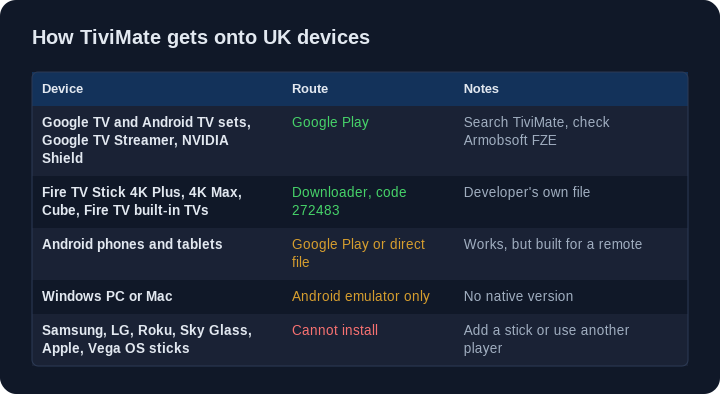
How TiviMate gets onto your telly depends on one thing: what the device runs. TiviMate is an Android app made by Armobsoft FZE, and the developer offers exactly two ways to get it. This guide sorts the devices sold in the UK into those that take the store version, those that take the direct download, and those that cannot run it at all. Tivimate, the company behind this site, sells an IPTV subscription, not the app.
Which UK devices can run TiviMate?
The TiviMate listing on Google Play says the app “is designed for Android TV and remote control navigation. It is not optimized for touch devices such as phones or tablets.” In practice that sorts UK hardware into three groups.
How do you install TiviMate from Google Play?
This is the simplest route and the one to prefer where it exists. It covers Google TV and Android TV televisions from Sony, TCL, Hisense and Philips, the Google TV Streamer, the older Chromecast with Google TV and the NVIDIA Shield.
- Open the Google Play Store from the TV’s home screen.
- Search for TiviMate and open TiviMate IPTV Player.
- Check the developer name reads Armobsoft FZE. Lookalike names exist.
- Select Install, then Open. Play keeps it updated from now on.
How do you install TiviMate on a Fire TV Stick?
TiviMate on a Firestick, as most people call Amazon’s Fire TV Stick, is not an Appstore install: the app is not listed there, so you fetch the developer’s own file instead. In short: allow unknown apps in Developer Options, install Downloader from the Appstore, type 272483 and select Install. Every screen, including what to do when Developer Options is hidden, is in our step-by-step TiviMate Downloader code guide.
One warning before you buy a new stick for TiviMate. Amazon’s newest sticks run Vega OS, which only installs Appstore apps. AFTVnews lists the Fire TV Stick 4K Select, the third-generation Fire TV Stick 4K and the 2026 Fire TV Stick HD as Vega OS, and the 4K Plus, 4K Max and Cube as Fire OS. A Vega OS stick cannot run TiviMate by any method.
Where is the official TiviMate download?
Both are named on tivimate.com: the Google Play listing, and a direct download at tivimate.com/apk, which redirects to the developer’s file server. Of the direct version the developer says “This version has fewer restrictions and checks for updates.” Any other TiviMate download, on a mirror, an archive site or a seller’s own domain, is a copy you cannot check, and files that claim to include paid features are modified. Use the store where your device has one and the developer’s file where it does not.
Can you install TiviMate on a phone or tablet?
On Android, yes: the Play Store will usually offer it, or the direct download works. The developer is clear that it is built for a remote, not a touchscreen, so expect it to feel clumsy. On an iPhone or iPad it cannot be installed at all, because there is no iOS version. A search of the UK App Store on 27 November 2026 found no app from Armobsoft FZE, only apps with similar names from other sellers.
Which TVs cannot run TiviMate?
- Samsung and LG smart TVs. They run Tizen and webOS, not Android.
- Roku devices and Roku-based TVs. Roku’s system takes no Android apps.
- Sky Glass and Sky Stream. A Sky Community answer explains that the platform has no open app store, so nothing can be added.
- Apple TV, iPhone and iPad. No iOS or tvOS version exists.
- Vega OS Fire TV Sticks. Appstore apps only, as above.
- Windows and Mac computers. Only inside an Android emulator; see running TiviMate on a Windows PC.
For those devices, the cheapest fix is usually a Fire OS or Google TV stick in a spare HDMI port. The other is a different player, and our guide to TiviMate alternatives by device lists what each platform’s developers offer.
What to have ready before you install
- Free space. A nearly full stick refuses installs. Remove apps you never open.
- Your provider’s login. Xtream Codes details, an M3U link or a portal address, ready to type.
- A steady connection. Ethernet or 5 GHz Wi-Fi makes the first channel list and guide load faster.
- Your Google account if you are installing from the Play Store.
After installing: add a playlist
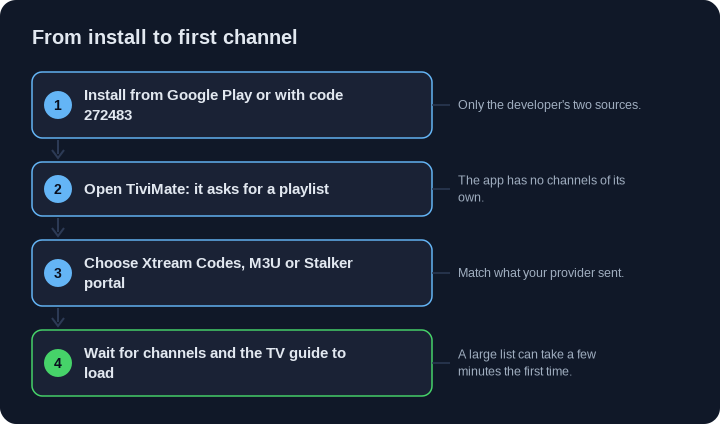
A fresh install opens to an empty screen asking for a playlist, because TiviMate contains no channels of its own. Choose Xtream Codes, M3U or Stalker portal to match what your provider sent; our guide to the three TiviMate playlist types walks through each, and the TiviMate settings guide covers what to change once channels load. If an install fails with “App not installed”, free some space and fetch the file again; if the app installs but will not play, start with what to do when TiviMate is not working.
Tivimate is an independent IPTV subscription for the UK, and our login works in TiviMate on Fire TV and Android TV. The Tivimate free trial lets you check the app, the device and your broadband together before you pay anything, and plans start at £15 for a month.
Frequently asked questions
How do you install TiviMate on Android TV?
Open the Google Play Store on the TV or box, search for TiviMate IPTV Player, check the developer reads Armobsoft FZE and select Install. It updates itself through Play from then on. If the store does not list it, the device is probably not a certified Android TV device, and the developer's direct download at tivimate.com/apk is the fallback.
Can you download TiviMate on a Samsung TV?
No. Samsung TVs run Tizen, and LG TVs run webOS; neither runs Android apps, and the developer makes no version for them. Plug a Fire TV Stick or a Google TV stick into a spare HDMI port, or use a player made for that TV, which our TiviMate alternative guide lists.
Is TiviMate on Apple TV?
No. The developer publishes TiviMate for Android only, and a search of the UK App Store finds no app from Armobsoft FZE. Apps there with similar names come from other sellers. On Apple TV, iPhone or iPad, use a player built for Apple devices instead.
Can TiviMate be installed on a Roku?
No. Roku devices run Roku's own system, which cannot install Android apps, and there is no TiviMate for Roku. The usual answer is a Fire TV Stick or a Google TV stick in another HDMI port.