
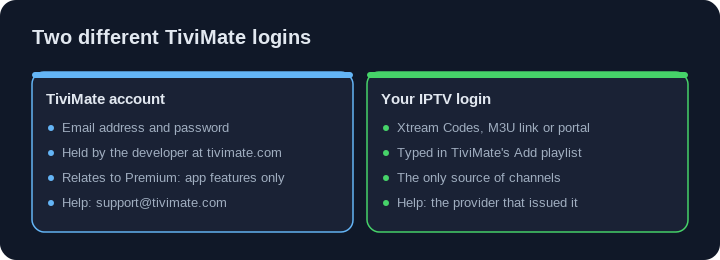
People search for a TiviMate login for two very different reasons: to sign in to the app’s own account, or to get their channels to load. They are held by different companies and typed into different places, and mixing them up is the most common reason a login “does not work”. Tivimate, the company behind this site, sells an IPTV subscription. We are not the developer of the TiviMate app, so we cannot see or reset a TiviMate account, only the IPTV logins we issue.
Which TiviMate login do you need?
Start from what you are trying to do. That tells you whose login it is and who can help.
The TiviMate account at tivimate.com
This belongs to the developer, Armobsoft FZE. The log-in page on tivimate.com asks for an email address and a password, with a Forgot password? link that sends reset instructions by email. The sign-up form asks for an email address and a password of at least six characters. The site’s account area is labelled Account, Subscription and Devices. We read the public pages on 27 November 2026 and did not sign up, so we have not seen what those sections show.
What the account is for, as far as the public pages say: it sits behind Premium, the paid upgrade that, in the words of the Google Play listing, “unlocks application features only”. The developer’s website says Premium is bought in the TiviMate app on a TV device or in the TiviMate Companion app on an Android phone. Our guides to what TiviMate Premium unlocks and costs and to the TiviMate Companion app cover each step. For account problems the developer’s address is support@tivimate.com.
Your IPTV login: Xtream Codes, M3U or portal
TiviMate is a player, and the listing is blunt about it: “To watch anything, you must add your own playlists.” It supports three formats, and each needs different details from your provider:
- Xtream Codes: a server address, a username and a password.
- M3U playlist: one long link, which usually has the username and password inside it.
- Stalker portal: a portal address, plus the device’s MAC address registered by the provider.
None of these is known to the developer, and none goes on tivimate.com. They go into TiviMate’s Add playlist screen; the full walk-through for each is in our guide to adding a TiviMate playlist.
Where to type each one
- On tivimate.com: the email and password you chose when you signed up, and nothing else.
- In TiviMate, first launch: the app asks for a playlist straight away. Choose the format your provider sent.
- In TiviMate, later: open the settings and the playlists section to add or edit one. Menu names can differ between versions, so go by the label.
- On a Fire TV Stick, for Premium: the activation steps TiviMate shows, after buying in Companion on a phone.
TiviMate login not working?
First work out which form refused you. The fix is then short.
On tivimate.com
Check you are using the email you signed up with, then use Forgot password?. A provider’s username will never work there. If Premium was bought through Google Play, check the device uses that same Google account. Anything beyond that goes to the developer; no IPTV provider can see this account.
On the Add playlist screen
- Copy, do not retype. A remote makes typos easy: watch 0 against O, capital letters, and a space pasted at the end.
- Check the server address. Keep the http:// or https:// and any port number, exactly as sent.
- Check the plan is still running. An expired plan looks like a wrong password.
- Check how many screens are on. Plans limit connections; ours cover 1 to 4 devices at once.
- Try a second player. If the same login fails there too, the account or the server is the problem, not TiviMate.
If the login is accepted and channels still fail, a number on screen tells you more: see TiviMate error 401, 403 and 429 for refused logins, or TiviMate not working for everything else.
If your IPTV login comes from Tivimate
Our subscribers get their login on WhatsApp after payment: a server address, username and password, with an M3U link or portal on request. There is no customer dashboard or website to sign in to, so treat any page asking you to log in to Tivimate on the web with suspicion. If your login stops working, message Ryan with the error and the time; support is 24/7. Not a subscriber yet? The 24-hour free trial of Tivimate gives you a working login to practise with, no card needed, and the Tivimate plans start at £15.
Keeping both logins safe
Anyone holding your IPTV details can use your connections, so never post them, or an M3U link, in a review, forum or screenshot. Enter them only in apps from an official store or the developer’s own site. Shared “Premium accounts” are outside the developer’s terms, which grant “a personal, non-transferable license”, and we do not point to any. If you think your details have leaked, ask your provider for new ones.
Frequently asked questions
How do you log in to TiviMate?
It depends which login you mean. For the developer's account, open tivimate.com/log-in and enter the email address and password you signed up with. To log in to your IPTV service, open TiviMate's Add playlist screen and enter the Xtream Codes details or M3U link your provider sent. Only the second brings channels.
How do you check your TiviMate account?
Sign in at tivimate.com. Its account area has sections labelled Account, Subscription and Devices, which is where the developer shows what is linked to the account. To check your IPTV account, such as its end date, ask the provider that sold it; TiviMate cannot see it.
How do you sign out of TiviMate?
On tivimate.com, use Log out in the account menu. Inside the app there is no single sign-out: your IPTV login lives in the playlist, so removing that playlist from the playlist settings is how you take it off a device, for example before you give the box away.