TiviMate is made by Armobsoft FZE. The app itself costs nothing to install, and Premium is the one thing its developer charges for. This guide sets out what the upgrade unlocks, what we could find about the price in pounds, how to pay on the devices most people in the UK use, and what Premium will never do. Tivimate, the company behind this site, sells an IPTV subscription and is not the developer, so we can describe the purchase but cannot see or fix anyone’s Premium account.
What is TiviMate Premium?
It is a feature upgrade to the player. The TiviMate listing on Google Play puts it plainly: “Any paid subscription or premium upgrade unlocks application features only; it does not include, or provide access to, any channels, streams, or media content.” Whatever you watch still comes from a playlist you add yourself, supplied by an IPTV provider. Paying for Premium changes what the app can do with that playlist, not what is in it.
What does TiviMate Premium unlock?
The developer lists the app’s features without saying which tier each belongs to. Independent guides such as FireStickTricks’ TiviMate page (February 2026) split them like this, and the Premium screen in your copy of the app is the final word:
- Free: one playlist, live channels and on-demand content from it, and the TV guide grid.
- Premium: more than one playlist, catch-up where your provider keeps an archive, recording, multiview, and extras such as parental controls and backup.
Recording is the feature most people buy it for. Our guide on recording programmes in TiviMate covers where the files go on a Fire TV Stick and how much space an hour takes. More than one playlist matters if you want to keep a second provider side by side, which our TiviMate playlist setup guide explains.
How much is TiviMate Premium in pounds?
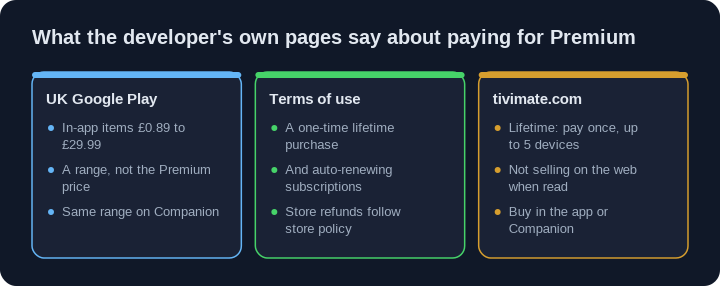
We cannot give you one fixed figure, and nor can most sites that quote one. Here is what the developer’s own pages show, checked on 27 November 2026:
- The UK Google Play listing gives the range of every in-app item as £0.89 to £29.99. That is the cheapest and dearest item on sale, not a Premium price, and TiviMate Companion shows the same range.
- The terms of use on tivimate.com say TiviMate “offers a one-time lifetime purchase and one or more auto-renewing subscriptions”. So there can be a pay-once option and a renewing one, and which ones you see depends on where you buy.
- Text on tivimate.com describes the lifetime option as “Pay once, with no subscription, and use Premium on up to 5 devices.” When we read the site it was not taking payment itself, and it pointed buyers to the app or Companion instead.
The reliable answer is the purchase screen. It lists the options and prices in pounds, including VAT, before you confirm. If you are weighing the whole bill, our guide to what TiviMate costs and what is free separates the app, Premium and the playlist, which is the part a provider charges for.
Lifetime purchase or subscription?
The terms describe both. A lifetime purchase is “a single payment with no recurring charges”. A subscription renews for the same period at the then-current price until you cancel. If both are offered, the maths is simple: a lifetime licence pays for itself once you would otherwise have renewed enough times to match it. Store purchases are refunded under that store’s policy; for purchases made directly on the developer’s website, the terms say sales are final, with refunds at the developer’s discretion and your statutory rights unaffected.
How do you buy Premium on Google TV or Android TV?
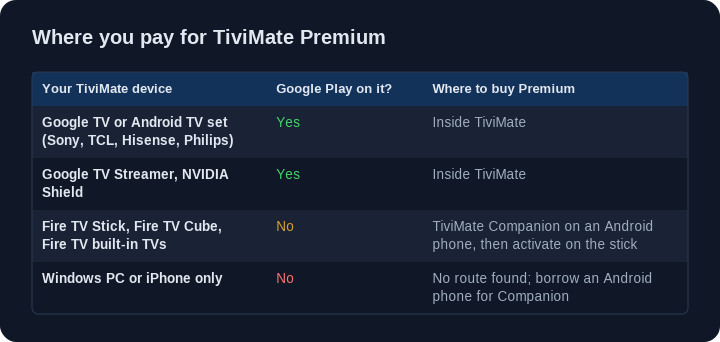
Devices with Google Play take the payment inside the app. That covers Google TV and Android TV sets from Sony, TCL, Hisense and Philips, the Google TV Streamer, Chromecast with Google TV and the NVIDIA Shield.
- Install TiviMate from Google Play on the TV or box; our guide to installing TiviMate on each device has the steps.
- Open TiviMate’s settings and find the Premium section. Menu names can change between versions.
- Read the options and prices shown in pounds and pick one.
- Confirm with the Google account signed in on that device. The purchase belongs to that account.
How do you buy Premium for a Fire TV Stick?
A Fire TV Stick has no Google Play, so TiviMate cannot take a Play payment on it. The developer’s answer is a second app. Its Companion listing says it “is intended to unlock Premium functionality of TiviMate IPTV player on devices without Google Play” and “allows managing your activated devices also.”
- Install TiviMate on the stick with the developer’s code; see the TiviMate Downloader code guide.
- On an Android phone, install TiviMate Companion from Google Play and check that the developer reads Armobsoft FZE.
- Buy Premium in Companion. It shows the price in pounds first.
- On the stick, open TiviMate’s Premium section and follow the activation steps on screen.
Our guide to the TiviMate Companion app goes through it in more detail, including what to do if you only own an iPhone.
Can you buy TiviMate Premium on a PC or an iPhone?
Not as things stood on 27 November 2026. tivimate.com has an account log-in, but its own wording says “You can buy Premium in the TiviMate app on your TV device or in the TiviMate Companion app on an Android phone.” We found no Armobsoft FZE app on the UK App Store, and Google Play in a web browser does not sell an app’s in-app upgrades. If a PC and an iPhone are all you have, borrowing any Android phone for the Companion purchase is the practical route; the phone is only where you pay. What a PC can and cannot do with TiviMate is covered in our guide to running TiviMate on a Windows PC.
Your Premium, your account and your devices
Premium follows the account you bought it with rather than one box. A Google Play purchase belongs to that Google account, and Google does not move purchases between accounts. The tivimate.com account and how it links to a purchase are explained in our TiviMate login guide. When a new box refuses to activate, the device list in Companion is the first place to look, because an old device may still hold a place. Questions about a payment go to the developer at the support address on its store listing, support@tivimate.com.
What about copies with Premium already unlocked?
They are modified files from someone other than Armobsoft FZE, and we do not link to them. The terms grant “a personal, non-transferable license” and forbid modifying the app, and a modified copy gets no updates and can carry anything onto a device that also holds your IPTV login. Names such as TiviMate Pro are a separate muddle, covered in our guide to what TiviMate Pro means.
Premium is the player; the playlist is separate
Even with every Premium feature unlocked, TiviMate shows nothing until you add a playlist. Tivimate is an independent IPTV subscription for the UK, not the TiviMate app, and our Xtream Codes login works in TiviMate whether or not you buy Premium. You can try it with the free 24-hour Tivimate trial, no card needed, or compare Tivimate plan prices from £15 a month, prepaid with no auto-renewal.
Frequently asked questions
How much is TiviMate Premium?
The developer prints no price on its public pages. The UK Google Play listing shows every in-app item between £0.89 and £29.99, which is a range rather than the Premium price. The purchase screen in TiviMate, or in TiviMate Companion for a Fire TV Stick, shows the options in pounds before you pay, and that is the figure you are charged.
Do I need TiviMate Premium?
Only if you want what it unlocks. The free app plays one playlist with the full TV guide. Premium is how you get recording, catch-up, multiview and more than one playlist. If you only watch live channels from one provider, try the free version for a while before deciding.
How many devices does TiviMate Premium cover?
Text on the developer's website describes the one-time option as Premium on up to 5 devices. Activations are tracked per device, and TiviMate Companion lists the devices your Premium is on, so you can free a place when you replace a box. Check the number on the purchase screen, because the website was not selling Premium itself when we read it.
How do I pay for TiviMate Premium?
On a Google TV or Android TV device you pay inside TiviMate through Google Play. On a Fire TV Stick, which has no Google Play, you pay in the TiviMate Companion app on an Android phone and then activate Premium on the stick. The developer's website points to those same two routes.