TiviMate, from Armobsoft FZE, is built for Android TV, so plenty of people need something else for at least one screen in the house. This guide sorts the alternatives by the device you want to watch on and sticks to what each developer says in its own store listing, as read on 27 November 2026. We make none of these apps, none pays us, and we have not tested them against each other, so nothing here is a ranking. Tivimate, the company behind this site, sells an IPTV subscription and is not connected to the TiviMate app.
Why look for a TiviMate alternative?
- Your device cannot run it. The TiviMate listing says it is designed for Android TV and not optimised for touch. There is no version for iPhone, Samsung or LG TVs, Roku or Windows, and Vega OS Fire TV Sticks cannot install it.
- You do not want to pay for Premium. Recording, catch-up, multiview and more than one playlist are Premium features; see our TiviMate Premium guide.
- You want one app on every screen. A household with a TV, an iPad and a laptop needs something cross-platform.
If TiviMate has simply stopped playing, a new app will not fix a dead login. Try the TiviMate not working checks first.
Apps like TiviMate, compared
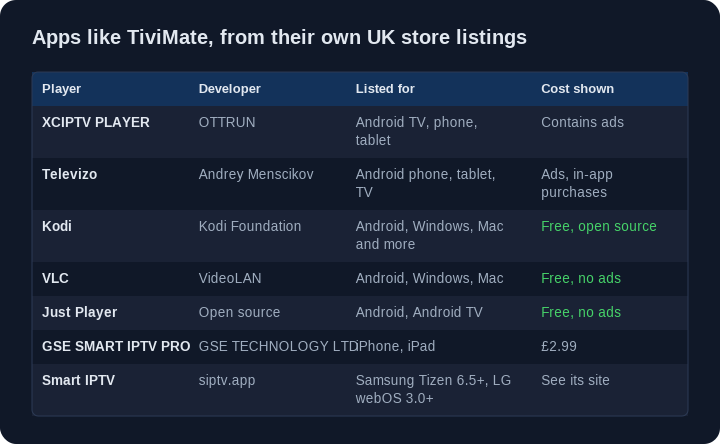
“Not listed” in a store page means the listing does not mention a feature, not that the app lacks it.
For Android TV, Google TV and Fire OS sticks
XCIPTV PLAYER, from OTTRUN, is the closest match on paper. Its listing names Android TV and D-pad navigation, a guide for Xtream Codes and M3U logins, catch-up, reminders, backup and scheduled recording to internal or external storage, with no paid tier mentioned. Google Play marks it as containing ads, and shows more than 10 million downloads.
Televizo, from Andrey Menscikov, lists multiple playlists, a programme guide, catch-up, Chromecast and parental control, and describes itself as for “your phone, tablet, or TV.” It contains ads and offers in-app purchases.
On a Fire TV Stick there is no Google Play, so check whether a player is in the Amazon Appstore, and if not, install it only from its developer’s own site. The same Vega OS rule applies as for TiviMate; our TiviMate Downloader code guide shows how to tell which system your stick runs. If you want to keep TiviMate but play some channels in another app, an external player is the middle way, explained in using an external player with TiviMate.
For iPhone, iPad and Apple TV
TiviMate has no Apple version, and apps on the App Store with similar names come from other sellers. GSE SMART IPTV PRO on the UK App Store costs £2.99 from GSE TECHNOLOGY LTD and is listed for iPhone and iPad. Read recent reviews before paying for any iOS player, and try a free one first if you can, since the App Store has many lookalikes.
For Samsung and LG smart TVs
Samsung’s Tizen and LG’s webOS cannot run Android apps. Smart IPTV is one player made for them: its developer announced app version 3.1.3 in July 2026 for Samsung Tizen 6.5 and later (2022 models onwards) and for LG webOS 3.0 and later. Its site sums it up as “Just a media player” with “No channels included”. The other route is a Fire OS or Google TV stick in a spare HDMI port, which lets you keep TiviMate; our TiviMate install guide covers both.
On a Windows PC or Mac
Kodi is free, open source and designed for a remote on a television, and with its IPTV Simple add-on it reads an M3U playlist with an XMLTV guide. VLC is free and plays a stream from its link, without a guide grid. Both run on Windows and Mac. Our guide to watching your playlist on Windows without TiviMate sets each one up, and if you want TiviMate itself on a computer, see running TiviMate on a Windows PC.
Free alternatives on Android
VLC for Android has no ads and is open source; Just Player is open source, based on ExoPlayer, with no ads and auto frame rate on Android TV. Neither is a full IPTV guide app like TiviMate, but both play channels from a playlist link and work well as a second player for testing.
What changes when you switch?
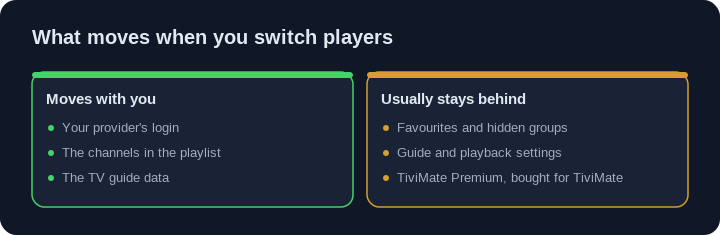
Avoid any “unlocked” copy of TiviMate or any other player: it is not the developer’s software, it gets no updates and it will ask for your login. And be wary of any player that comes with channels already inside it; none of the listings above offers content.
Whatever the player, you still need a provider
None of these apps includes channels. Tivimate is an independent IPTV subscription for the UK, and our login works in TiviMate and in other players that accept Xtream Codes or M3U, on Fire TV, Android TV, Apple TV, smart TVs, iPhone and Windows. Try it in the player you choose with the 24-hour Tivimate trial in that player, no card needed, or compare the Tivimate plans from £15.
Frequently asked questions
Is TiviMate the best IPTV player?
There is no single best player, because each is built for different hardware. TiviMate is designed for Android TV with a remote and runs nowhere else. On an Android TV box it is a strong choice; on an iPhone, a Samsung TV or a laptop it is not an option, so the best player there is one made for that device.
Is TiviMate on iOS?
No. The developer publishes TiviMate for Android only, and a search of the UK App Store finds no app from Armobsoft FZE. Apps with similar names there come from other sellers. On an iPhone or iPad, choose a player listed for iOS, such as GSE SMART IPTV PRO.
Is there a free alternative to TiviMate?
Kodi and VLC are free and open source, and Just Player is free with no ads. XCIPTV is free to install and carries ads. None of them includes channels: each needs a playlist from a provider, just like TiviMate.