
TiviMate is only a player. Its Google Play listing says it “is a media player only and does not provide any content”, so a lot of what looks like the app breaking is really the playlist behind it. This guide helps you decide which of three things has failed (the app, your login, or the provider’s server) and then fix that one. The developer publishes no troubleshooting manual we could read, so menu names are the ones in common use and may differ in your version. Tivimate, the company behind this site, sells an IPTV subscription and does not make the app.
Is TiviMate down, or is it something else?
TiviMate runs on your own device and streams nothing itself, so there is no TiviMate service that can go down for everyone at once. When every channel fails together, the cause is nearly always the provider’s server, your plan or your connection. We know of no official status page. The quickest test is the one below, and it takes two minutes.
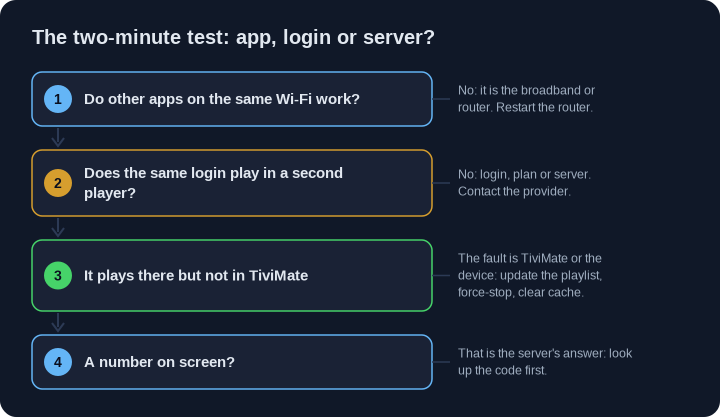
For the second player, any app that accepts the same login will do; our guide to using an external player with TiviMate names three free ones, and the TiviMate alternatives by device cover phones and computers.
What are you seeing?
No channels, or the list never finishes loading
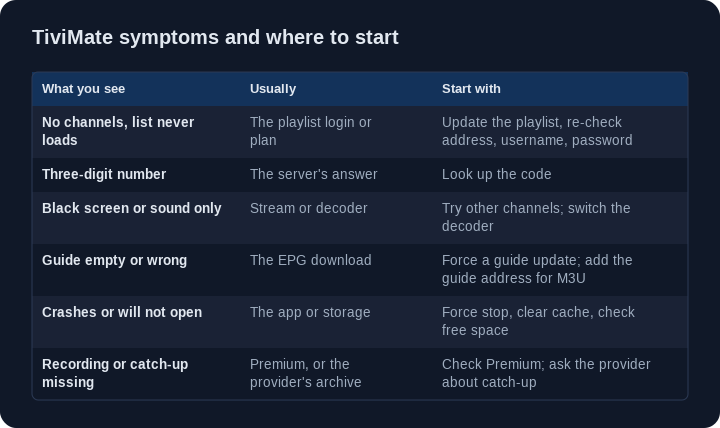
This is almost always the playlist. Open the playlist settings and update it. Then check the server address, username and password exactly as the provider sent them, keeping http:// or https:// and any port number, and watching for a space pasted at the end. Check the plan has not run out. A very large list can take a few minutes the first time. Our TiviMate playlist guide has a table of load failures and their causes.
A number on screen
A three-digit number is the server answering, and it tells you who can fix it. Our guides cover the common ones: errors 401, 403 and 429 for refused logins, error 511 and code 521 for network sign-ins and servers that are down, error 458 for a code only your provider can explain, and the HttpDataSource exception for the long technical message.
Black screen, sound with no picture, or freezing
Try three or four channels from different groups. One bad channel is that stream; all of them is the account, the server or your connection. Sound without picture often responds to switching the decoder between hardware and software in the playback settings. Stutter that comes and goes is more often broadband than the app, and the FAQ below covers it.
TV guide empty or wrong
The guide is a separate download from the channels, so channels can work while it does not. Force a guide update from the EPG settings. An M3U playlist may need the provider’s guide address added by hand.
The app crashes or will not open
Force-stop TiviMate in the device’s app settings and open it again. If that fails, clear the cache, which keeps your playlists. Clear data only as a last resort: it wipes the whole setup. Check the free storage too, because a full stick struggles to save a large guide.
TiviMate not working on a Firestick
Check the model first. AFTVnews lists three Fire TV Sticks that run Vega OS, the Fire TV Stick 4K Select, the third-generation Fire TV Stick 4K and the 2026 Fire TV Stick HD, and none of them can install TiviMate. If you moved to a new stick and the app will not go on, that is why. On Fire OS sticks, free storage is the next suspect. If the app went missing after a reset, reinstall it from the developer’s own source with our TiviMate Downloader code guide, not from a mirror site.
If Premium features such as recording stopped on a stick, Premium there is managed through the developer’s Companion app, not your IPTV provider; see our TiviMate Companion guide.
On a phone or tablet
The developer says TiviMate is designed for Android TV and remote control navigation and not optimised for touch. If it behaves badly on a phone, that may be all that is wrong, and a player made for phones may suit you better.
Recording, catch-up or multiview missing
These are Premium features, so a free copy will not show them; our guide to what TiviMate Premium unlocks explains what it unlocks. Catch-up also needs an archive on the provider’s side, and recording needs storage the device can write to.
Who can fix it?
Your provider handles channels, logins, guide data and server errors. The developer, Armobsoft FZE, handles the app and Premium. You handle the device, the broadband and the details you typed. If Tivimate is your provider, message Ryan on WhatsApp with the error, the time and a channel name; support is 24/7 for the service we sell, though we cannot change the app. Still choosing a provider? The free Tivimate trial for 24 hours lets you test on your own TV first, and Tivimate plans start at £15.
Frequently asked questions
Why is TiviMate not working today?
If it worked yesterday and nothing on your side changed, the provider's server or your plan is the likeliest cause. Try the same login in a second player: if it fails there as well, the app is not to blame, so contact the provider with the time and a channel name. We know of no official TiviMate status page.
How do you restart TiviMate on a Firestick?
Open Settings, Applications, Manage Installed Applications, choose TiviMate and select Force stop, then open it again from the home screen. Pressing Home only hides the app. For a full restart, pull the stick's power for ten seconds or use Settings, My Fire TV, Restart.
How do you stop TiviMate from buffering?
Find out whether it is one channel or all of them. One channel is that stream. All of them points at the connection or the server: try a wired connection or 5 GHz Wi-Fi, restart the router, and switch off any VPN to test. A larger buffer in TiviMate's playback settings can smooth short dips but cannot fix a slow server.