TiviMate Companion is a small helper app, separate from the TiviMate player, and most people only meet it when they try to buy Premium for a Fire TV Stick and find there is no way to pay on the stick. This guide sticks to what the developer itself says the app does, and shows the purchase step by step. Tivimate, the company behind this site, sells an IPTV subscription and is not the developer of TiviMate or Companion.
What does the TiviMate Companion app do?
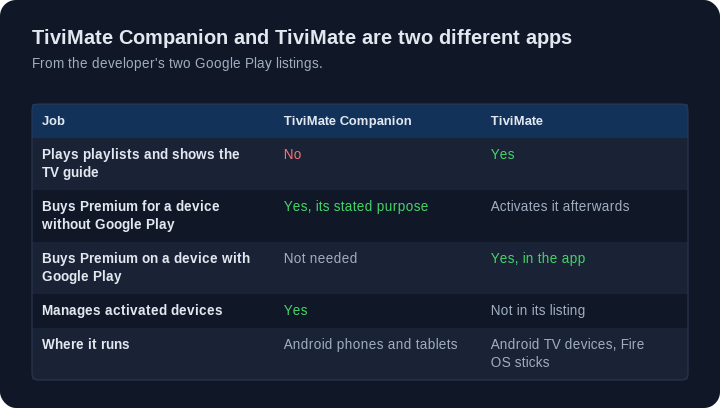
Two things. The Companion listing on Google Play reads, in full: “This app is intended to unlock Premium functionality of TiviMate IPTV player on devices without Google Play. It allows managing your activated devices also. It is not IPTV player app!” The listing names Armobsoft FZE as the developer, shows more than a million downloads, and was last updated on 15 November 2026.
Everything you watch, browse or set up happens in the main TiviMate app on the TV device. Companion has no playlists, no TV guide and no remote-control features in its listing.
Who needs TiviMate Companion?
Anyone running TiviMate on a device without Google Play who wants Premium. In UK homes that almost always means an Amazon Fire TV Stick, Fire TV Cube or a TV with Fire TV built in. TiviMate is not in the Amazon Appstore, so it goes onto those devices from the developer’s file, and with no Google Play on the device it cannot take a Play payment there. Companion fills that gap.
If your TiviMate runs on a Google TV or Android TV device, such as a Sony or TCL television, a Google TV Streamer or an NVIDIA Shield, you buy Premium inside TiviMate and can ignore Companion for the purchase. The developer’s site, tivimate.com, describes the same two routes: “You can buy Premium in the TiviMate app on your TV device or in the TiviMate Companion app on an Android phone.”
How to unlock TiviMate Premium on a Fire TV Stick with Companion
The developer does not publish screenshots of each step, so the button names below may differ slightly in your version. Go by what each option does.
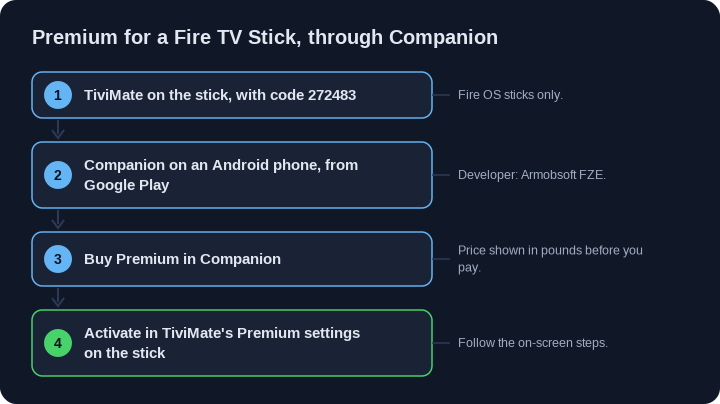
- Install TiviMate on the Fire TV Stick first, with the developer’s code in our TiviMate Downloader code guide.
- On an Android phone or tablet, install TiviMate Companion from Google Play. Check the developer shows as Armobsoft FZE.
- Open Companion and choose the Premium purchase. Read the options and the price in pounds, then pay through Google Play on the phone.
- On the stick, open TiviMate, go to the Premium section of its settings and follow the activation steps on screen.
What Premium unlocks, and what is known about its price and the lifetime option, is in our TiviMate Premium explainer.
How to manage activated devices in Companion
The listing says only that Companion “allows managing your activated devices”, without spelling out each option, so read the choices on screen before you change anything. The device list matters at three moments: when you replace a Fire TV Stick, when a new box refuses to activate, and when you stop using an emulator on a PC. Removing the old entry frees its place for the new device. The developer’s website also has a Devices section in its account area, explained in our TiviMate login guide.
Can you get TiviMate Companion on an iPhone?
No. Companion is published on Google Play only, and a search of the UK App Store on 27 November 2026 found no app from Armobsoft FZE; apps there with TiviMate-like names come from other sellers and are not Companion. If an iPhone is your only phone, borrowing any Android phone or tablet for the purchase is the practical answer. Premium follows the account, not the phone, so the borrowed phone is only where you pay.
What TiviMate Companion is not
- Not a player. You watch in TiviMate on the TV device. Companion plays nothing.
- Not a remote. No remote features are listed. The Fire TV app or Google TV app from the device’s maker does that job.
- Not where playlists go. Logins and guide addresses are added in TiviMate itself; see our how to add a playlist in TiviMate.
- Not a source of channels. The TiviMate listing says paid upgrades unlock “application features only”.
- Not an unofficial download. Companion is the developer’s own app on Google Play. Files elsewhere that claim to unlock Premium are not from Armobsoft FZE.
Premium unlocked: now add channels
With Premium active, TiviMate still needs a playlist from an IPTV provider. Tivimate is an independent IPTV subscription for the UK, not the TiviMate app or Companion, and our Xtream Codes login works in TiviMate on a Fire TV Stick. Try it first with the free 24-hour Tivimate trial, no card needed, or see Tivimate prices from £15 a month.
Frequently asked questions
How do you install TiviMate Companion on a Firestick?
You do not. Companion is distributed through Google Play for Android phones and tablets, and a Fire TV Stick has no Google Play. Install TiviMate itself on the stick with the developer's Downloader code, install Companion on an Android phone, buy Premium there, then activate it in TiviMate on the stick.
Is TiviMate Companion free?
It is free to install. Its UK Google Play listing shows in-app purchases from £0.89 to £29.99 per item, and those purchases are TiviMate Premium. Companion shows the actual options and prices in pounds before you pay.
Can TiviMate Companion be used as a remote?
Not according to its developer. The listing describes two jobs, unlocking Premium and managing activated devices, and says it is not a player. To control TiviMate from a phone, use the Fire TV or Google TV app made by the device's own maker.