On a Google TV set, TiviMate is a normal Play Store install. On an Amazon Fire TV Stick it is not in the store, so it goes on from a file. A six-digit Downloader code saves you typing a web address with the remote. Plenty of codes are passed around for TiviMate; this guide gives only the one the developer, Armobsoft FZE, publishes itself, and shows where it leads. Tivimate, the company behind this site, sells an IPTV subscription and does not make the app.
What is the TiviMate Downloader code?
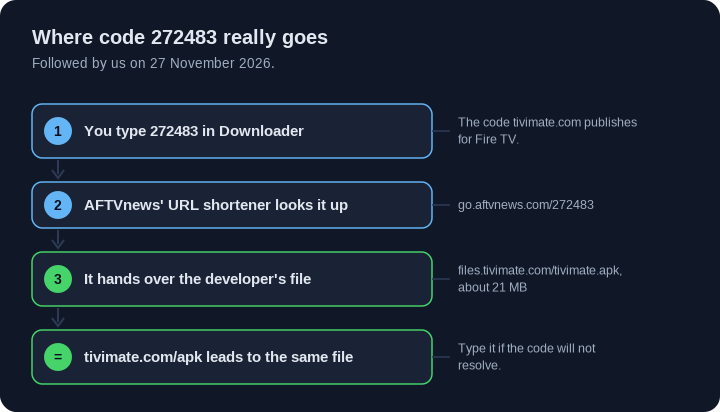
It is 272483. The developer’s website, tivimate.com, tells Fire TV users: “In the Downloader app, enter code 272483 or URL tivimate.com/apk.” Downloader is a free app from AFTVnews, and according to its own page a code is “a numeric short code generated by the AFTVnews URL Shortener”: a short number standing in for a long address. It is not a licence key and it does not unlock anything.
Before publishing this page we followed both routes ourselves. The code redirects through AFTVnews’s shortener to files.tivimate.com/tivimate.apk, and tivimate.com/apk lands on the same file, an Android package of about 21 MB. So whichever you type, the file comes from the developer’s own server.
Which Fire TV Sticks accept the TiviMate code?
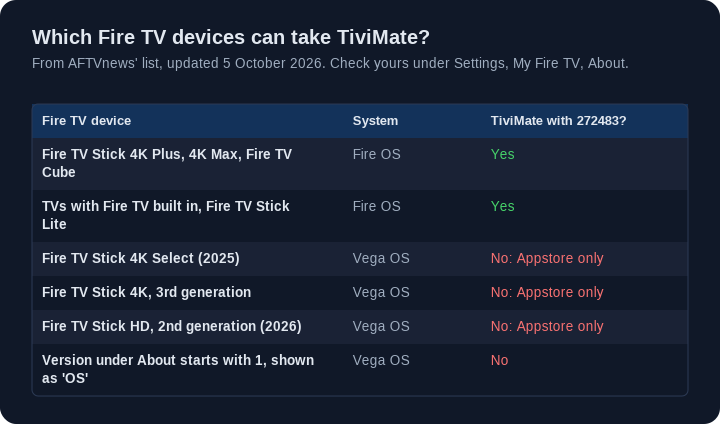
Every Fire TV device that runs Amazon’s Android-based Fire OS can install TiviMate this way. Amazon is moving its sticks to a different system, Vega OS, which installs only Amazon Appstore apps and has no unknown-sources setting. Amazon’s developer site says that starting with the Fire TV Stick 4K Select, all future Fire TV Sticks will run on Vega, and the 4K Select is on sale in the UK.
AFTVnews’ list, updated on 5 October 2026, names three Vega OS sticks: the Fire TV Stick 4K Select (2025), the third-generation Fire TV Stick 4K and the second-generation Fire TV Stick HD (2026). It lists the Fire TV Stick 4K Plus, 4K Max and Lite, the Fire TV Cube and TVs with Fire TV built in as Fire OS. To check yours, open Settings, My Fire TV, About: AFTVnews says a Vega OS device shows its software version as “OS” with a number starting with 1.
How do you install TiviMate with code 272483?
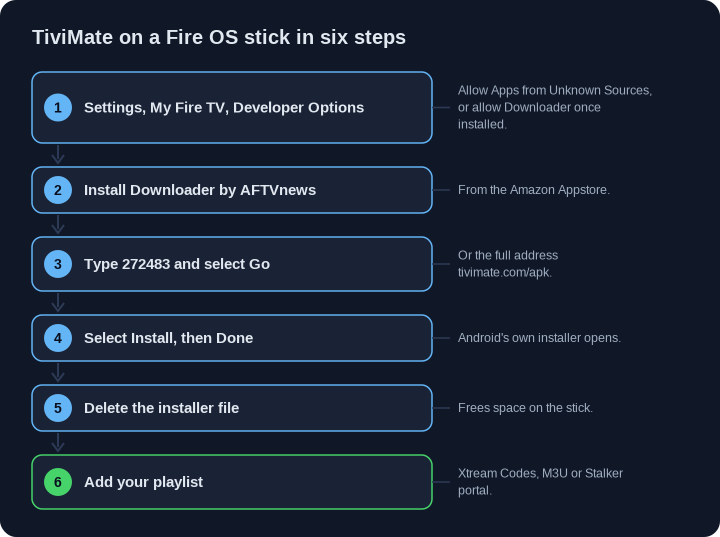
- Allow unknown apps. Open Settings, My Fire TV, Developer Options. Amazon’s developer documentation names the setting Apps from Unknown Sources; newer software lists apps one by one, so you allow Downloader once it is installed.
- Install Downloader. Search the Fire TV home screen for Downloader and install the app by AFTVnews from the Amazon Appstore.
- Type the code. Open Downloader, select the address box, type 272483 and select Go. If the code will not resolve, type tivimate.com/apk instead.
- Install the file. When the download finishes, Android’s installer opens. Select Install, then Done.
- Delete the installer. Downloader offers to delete the file. Do it: TiviMate is installed, and a Fire TV Stick has little space to spare.
- Add a playlist. TiviMate opens empty and asks for one. Our guide to adding a TiviMate playlist covers Xtream Codes, M3U and Stalker portal logins.
What if Developer Options is missing?
On many Fire OS versions the menu is hidden until you unlock it. AFTVnews’ instructions are to open Settings, My Fire TV, About, highlight the first line, which is your device’s name, and press the select button seven times. A message says you are now a developer, and Developer Options appears when you go back. If there is no such menu even then, check the software version as above: a Vega OS stick cannot install TiviMate whatever you do.
The direct download or the Play Store version?
The developer offers both, and says of the file the code fetches: “You can install TiviMate directly. This version has fewer restrictions and checks for updates.” On a Fire TV Stick the direct version is the only option, since there is no Google Play. On Google TV and Android TV, use the Play Store and let it handle updates; there is no reason to use Downloader there. Our TiviMate install guide for every device covers each route.
Is there a TiviMate Premium Downloader code?
No. One app, one code. Premium is an upgrade bought after installing, and for a Fire TV Stick you buy it in the developer’s Companion app on an Android phone, then activate it on the stick; see the TiviMate Companion guide or our TiviMate Premium in the UK for what it costs. A code that promises Premium for free leads to a modified file from someone else. We do not repeat such codes, and nor do we give codes for lookalikes such as the app in our TiviMate 8K Pro explainer.
What if the code does not work?
- Downloader says it is blocked: it is not yet allowed to install apps. Go back to step 1 and allow it.
- The code does nothing: check the stick is online, then type the full address tivimate.com/apk.
- “App not installed”: usually too little free space. Remove apps you do not use and old files in Downloader, then try again.
- TiviMate opens but nothing plays: the install worked and the playlist is the problem. Our TiviMate not working guide narrows it down.
Next: something to watch
TiviMate is only the player. Tivimate is an independent IPTV subscription for the UK, not the TiviMate app, and it works on a Fire TV Stick: you get an Xtream Codes login on WhatsApp to type into the Add playlist screen. Try it with the free 24-hour trial on your Fire TV Stick, no card needed, or see the Tivimate plans from £15.
Frequently asked questions
Can you download TiviMate on a Firestick?
Yes, on any Fire TV Stick that runs Fire OS. TiviMate is not in the Amazon Appstore, so you fetch the developer's own file with the Downloader app and code 272483. Sticks that run Vega OS, such as the Fire TV Stick 4K Select, only install Appstore apps and cannot take TiviMate at all.
How do you sideload TiviMate on a Firestick?
Allow apps from unknown sources in Developer Options, install Downloader from the Amazon Appstore, type 272483 and let it fetch the file, then select Install. Sideloading only means installing from a file instead of a store; with this code the file comes from the developer's own server.
Does TiviMate still work on a Firestick?
On Fire OS sticks it does: the developer still publishes the code and the file for them, and the direct version checks for its own updates. What changed is that Amazon's newest sticks run Vega OS, which cannot install it. Check the software version under About before you buy a new stick for TiviMate.