There is no single best device for TiviMate, and anyone naming one without knowing your television, your router and your budget is guessing. What can be said honestly is which types of device run the app properly, and what each type trades away. This guide does that from the makers’ published specifications and our TiviMate device compatibility table, which lists every UK model with its source. We have not tested these devices, we name no prices, and we earn nothing from any of them. Tivimate, which runs this site, sells an IPTV subscription and is not the developer of TiviMate.
The two things that are not optional
- An official route to the app. Google Play, or the developer’s own file through Downloader code 272483 on Fire OS. Those are the only two the developer offers.
- Android 6.0 or later, which the Play listing requires. Anything bought new this year meets it; some very old Fire TV devices on Fire OS 5 do not.
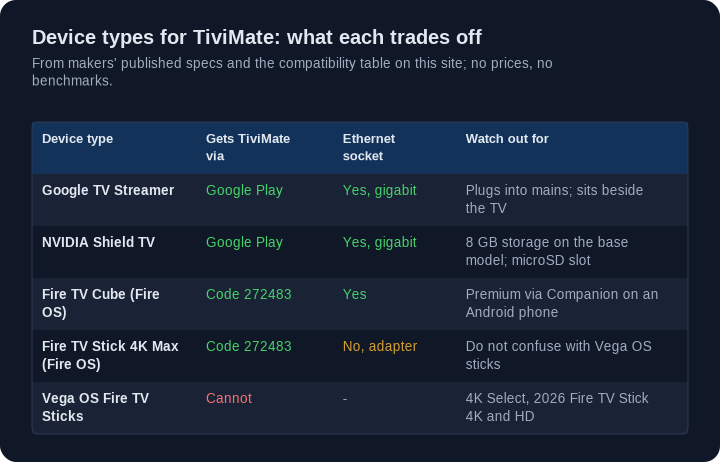
Amazon’s newest sticks fail the first test. AFTVnews reports Amazon’s statement that every Fire TV Stick from the 4K Select onwards runs Vega OS, which cannot install TiviMate, and calls the 4K Plus and 4K Max the last sticks that allow it. Check the exact model before you buy.
Google TV devices: the simplest route
A device with Google Play installs TiviMate from the store, updates it from the store, and lets you buy Premium inside the app. That makes this the least fiddly choice.
- Google TV Streamer. According to Google’s UK spec sheet it has 4 GB of memory, 32 GB of storage and an Ethernet port rated 10/100/1,000 Mbps. It sits beside the TV rather than behind it, which helps both Wi-Fi and the cable.
- NVIDIA SHIELD TV. NVIDIA lists gigabit Ethernet, 2 GB of RAM, 8 GB of storage on the base model and a microSD slot, on Android 11. The storage is the smaller of the two, which matters if you record.
- Google TV or Android TV boxes from other makers. Prefer one with Google Play built in. A box without it can take the developer’s file, but skip any box sold with a TiviMate copy already loaded: you cannot tell who made that copy.
Fire OS devices: fine, with three catches
A Fire TV Stick 4K Max, Fire TV Stick 4K Plus or Fire TV Cube runs TiviMate through the developer’s file. The Fire TV Cube has an Ethernet jack and 16 GB of storage, according to Android Authority’s review. The three catches:
- Vega OS lookalikes. The 2026 Fire TV Stick 4K and Fire TV Stick HD share names with Fire OS models but cannot run it.
- No wired socket on a stick. Amazon sells an Ethernet adapter, and a strong Wi-Fi signal behind the TV matters more than the stick itself.
- Premium needs a phone. With no Google Play on the device, Premium is bought in the TiviMate Companion app on an Android phone; see our guide to TiviMate Companion.
Four questions that pick the type for you
- Can a cable reach the router? If yes, favour a device with an Ethernet socket. If not, favour one that sits in the open rather than behind the TV.
- Will you record? Then storage and a USB port that takes a drive matter more than anything else on the spec sheet.
- How will you pay for Premium, if at all? A device with Google Play buys it inside TiviMate. A Fire OS device needs TiviMate Companion, which runs on an Android phone or, according to tivimate.com, an Android emulator.
- How many TVs? Each TV needs its own device, and each one watching at the same time uses a connection on your IPTV plan. Two cheaper devices can make more sense than one expensive one.
4K and HDR: only if the TV can show them
A 4K device on a Full HD TV still shows Full HD. Google’s own spec sheet for the Google TV Streamer says so in its footnote: to view content in 4K, a 4K-capable TV and a reliable broadband connection are also required. The same sheet lists output up to 4K HDR at 60 frames per second, with Dolby Vision, HDR10, HDR10+ and HLG, and says a certified HDMI 2.1 cable is needed and sold separately. For IPTV, the stream matters too: a channel only looks 4K if the provider sends it in 4K; on Tivimate’s own service, that is 4K on selected channels. Pay for 4K if your TV has it; do not expect it to improve an HD channel.
Buying second-hand or using an old device
- Check the system, not the name. Look in the device’s About screen before money changes hands: Fire OS or Android TV, never Vega OS, and Android 6.0 or later.
- Reset it to factory settings. That removes the last owner’s accounts and any apps they loaded, including unofficial copies of TiviMate.
- Reinstall TiviMate yourself from Google Play or code 272483, so you know where your copy came from.
- Premium does not come with the box. It belongs to the previous owner’s account; you activate your own.
What makes a real difference day to day
- A wired connection. Live TV is a steady stream, and Wi-Fi dips show up as stalls. If the router is near the TV, an Ethernet socket is the single most useful feature. Our TiviMate buffering fix explains how to tell a connection problem from a server one.
- Storage. A large playlist’s guide takes space, and recordings take much more. Recording to a USB drive needs a device with a USB port that accepts storage; see how recording on TiviMate works.
- The remote. TiviMate is built for a remote, and you will press the same buttons every evening. Number keys, a dedicated guide button or a backlight are matters of taste; try the remote in a shop if you can.
- Where it sits. A puck or box beside the TV gets better Wi-Fi than a stick behind a wall-mounted set.
Before you buy anything
Check what you already have. Many televisions sold in the UK run Google TV or Fire TV and can install TiviMate directly, with no extra box at all. Our guide to using TiviMate on a smart TV shows how to tell. If you have an Apple TV, there is no TiviMate for it, but there are players that load the same login; see our TiviMate alternative for Apple TV. Once you have a device, the steps for each are in our guide to putting TiviMate on each UK device.
The device plays it; the playlist supplies it
No device and no player comes with channels. Tivimate is an independent IPTV subscription for the UK, not the TiviMate app, and its Xtream Codes login works in TiviMate on any device above that can run it. Try it with the free trial on your new device, which lasts 24 hours and needs no card, or see plans from £15.
Frequently asked questions
Is TiviMate blocked on Firestick?
Not on Fire OS sticks: the developer still publishes its file and the Downloader code 272483 for them, and the Fire TV Stick 4K Max, 4K Plus and Fire TV Cube take it. What has changed is that Amazon's newest sticks run Vega OS, which installs Appstore apps only, so TiviMate cannot go on those at all. Check the model before you buy.
How do I get TiviMate on my Firestick?
On a Fire OS stick, turn on apps from unknown sources for Downloader, install Downloader from the Amazon Appstore, enter the developer's code 272483 and choose Install. TiviMate is not in the Amazon Appstore itself. Premium for the stick is bought in the TiviMate Companion app on an Android phone.