
These are the two player apps UK viewers ask about most, and comparisons online usually end with a confident winner nobody measured. This page does not. It sets out what each developer publishes, as read on 27 November 2026, which devices each one actually installs on, and how to compare them yourself in an evening. Tivimate, the company behind this site, sells an IPTV subscription; we are not the developer of either app, and neither pays us.
IPTV Smarters Pro vs TiviMate at a glance
“Listed” below means the developer names the feature: TiviMate on its Google Play listing, IPTV Smarters on its features page. It does not mean we confirmed how well it works, and “not listed” does not prove an app lacks something.
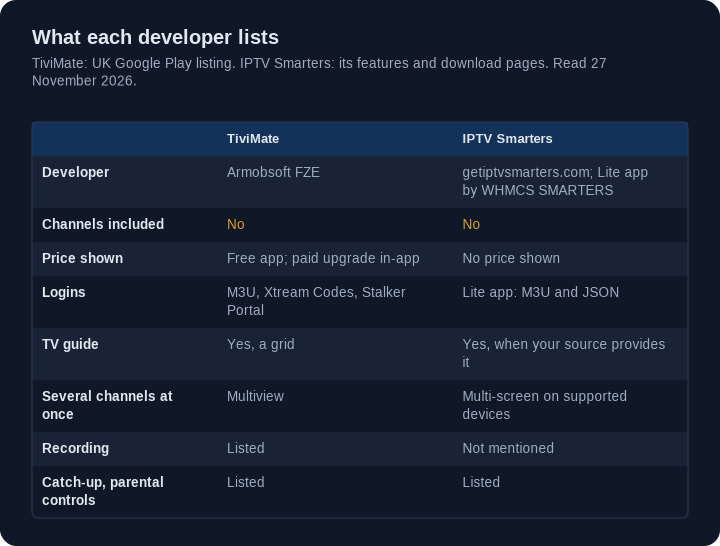
Two differences stand out. TiviMate lists recording; the Smarters features page does not mention it. And Smarters describes its multi-screen view as working “on supported devices” without naming them, while TiviMate’s multiview is generally reported as part of its paid upgrade. Neither developer publishes a maximum number of channels on screen.
The Smarters features page also names picture-in-picture and support for external players. TiviMate’s listing names neither, although the app has a picture-in-picture setting and an external player option in its settings; see our guide to changing TiviMate’s external player.
Which one installs on your device
On many UK screens the choice is made for you. The Smarters routes come from its download page, which says “The application is not distributed through any other website.”
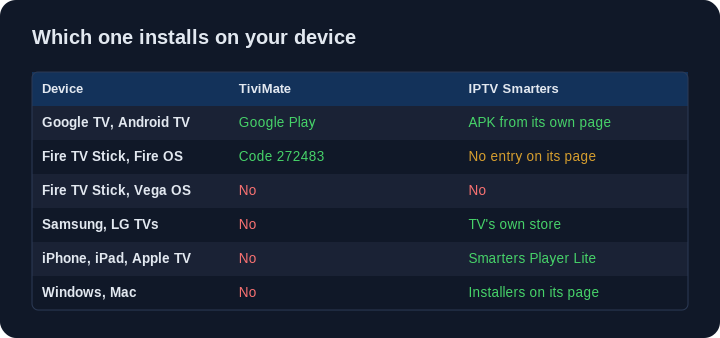
- Fire TV Stick on Fire OS: TiviMate has the developer’s own Downloader code, 272483; the Smarters page has no Fire TV entry. Sticks on Vega OS, such as the Fire TV Stick 4K Select, install neither.
- Google TV and Android TV: TiviMate from Google Play; Smarters as an Android TV file from its own page.
- Samsung and LG TVs: only Smarters, through the TV’s store. Its page says that while its updated Samsung app is in review, Samsung owners can install it from a USB drive instead.
- iPhone, iPad and Apple TV: only Smarters, as a separate app, Smarters Player Lite by WHMCS SMARTERS. Other App Store apps use the Smarters name under different sellers, so check the seller. UHF is another Apple player; see our UHF and TiviMate comparison.
- Windows and Mac: only Smarters, with installers on its page.
For the TiviMate side in detail, see our guide to the devices that run TiviMate, and for phones, TiviMate on iPhone and Android phones.
Getting each app from the official source
Both names are copied widely, so where you install from matters as much as which app you choose.
- TiviMate: Google Play, where the listing shows Armobsoft FZE and its address finishes with
id=ar.tvplayer.tv, or on a Fire TV the Downloader code 272483 from tivimate.com. The developer’s site says its own direct download “has fewer restrictions and checks for updates”. - IPTV Smarters Pro on Android, Android TV, Windows and Mac: only the download page above. It prints a SHA-256 checksum beside each file, so anyone comfortable with a checksum tool can confirm the file they downloaded is the one published.
- Smart TVs: on an LG set the page says to search the LG Content Store for IPTV Smarters Player; on Samsung, the TV’s own store or the USB route while the update is in review.
- Apple devices: the page names Smarters Player Lite with its App Store ID, 1628995509, which is the number at the end of the official listing’s address.
Anything that arrives with channels already inside it, or a paid upgrade already switched on, did not come from either developer.
What each one costs
TiviMate is free to install, and its upgrade is bought inside the app. The UK Google Play listing shows in-app items from £0.89 to £29.99, which is a range, not the upgrade’s price; the purchase screen shows that in pounds. The Smarters download page shows no price or paid tier, and Smarters Player Lite is free on the UK App Store. So trying either costs you an evening, not money. Neither developer sells channels: both still need a login from an IPTV provider. Our page on what TiviMate costs and what is free has more.
Logins and the TV guide
TiviMate accepts M3U links, Xtream Codes logins and Stalker portals, and draws its guide as a grid. Smarters lists an electronic programme guide “when your source provides EPG data”, and its Lite app for Apple devices names M3U and JSON playlists. If your provider sends Xtream Codes details, check that the Smarters app for your device accepts them before you plan around it. Our guide to adding a playlist in TiviMate shows the three types.
How to compare them fairly
- Use the same login in both, on the same device and connection.
- Test at the same time of day, ideally a busy evening.
- Pick the channels you actually watch, not a random sample.
- Use each guide with your own remote for a while; comfort is a real difference only you can judge.
- Note anything that fails in both. That fault is the provider or the network, not either app.
Run them one after another, not at once: two apps streaming together use two connections. If both stall on the same channel, start with our buffering fixes.
Which suits a typical UK home
Without measurements, the useful question is which screens you watch on. A household that watches on one Fire TV Stick or a Google TV set has both options and can simply try them. A household with a Samsung or LG TV in the lounge, an iPad in the kitchen and a laptop upstairs has only one app that installs on all of those, and that settles it. Many people end up using both: TiviMate on the main TV with a remote, and Smarters where TiviMate does not exist. Your provider’s login works in each, within your plan’s connection limit.
If the guide grid matters most to you, look at both on your own TV with your own provider’s guide data: a guide is only as good as the listings behind it, and our TiviMate EPG guide explains why rows can be blank in any player.
Switching from one to the other
Your channels come with you, because they belong to the provider: add the same details to the new app and the list reloads. Your personal setup does not. Favourites, hidden groups and channel order are stored by each app, and we know of no way to carry them between these two. TiviMate’s own backup and restore only restores into TiviMate.
Mistakes to avoid
- Blaming the app for the provider. If it fails in both, neither app is the cause.
- Paying an app developer for channels. Neither sells them. A seller offering a “Smarters subscription” or a “TiviMate subscription” is an IPTV provider using the app’s name, as are we: Tivimate is our service, not the app.
- Installing a modified copy. Files with paid features unlocked are not the developers’. We do not link to them.
If you need a login to test with, Tivimate is an independent IPTV subscription for the UK. It gives Xtream Codes details on WhatsApp after payment, and they work in TiviMate. Load them into both apps during the free 24-hour Tivimate trial, no card needed, then see plans from £15.
Frequently asked questions
Which is better, TiviMate or IPTV Smarters Pro?
We cannot honestly say, because we have measured neither, and there is no independent test we would rely on. Start with your screens: on Samsung, LG, iPhone, Windows and Mac only Smarters has an app, and on a Fire TV Stick only TiviMate has an official route. Where both install, load the same login into each and keep the one you prefer.
Can you use one IPTV login in both apps?
Usually, if your provider's login is a type both accept. TiviMate takes M3U, Xtream Codes and Stalker Portal. Check the Smarters app for your device against what your provider sends. Both apps playing at the same time count as two connections, so stay within your plan's limit.