
TiviMate does not invent its error numbers. It is a player made by Armobsoft FZE, and the developer’s Google Play listing calls it “a media player only” that “does not provide any content”. When a channel fails, the number on screen is usually the status code your provider’s server sent back. The developer publishes no list of codes, so this page reads each number against the web standard that defines it, says who can fix it, and links to our longer guides for the ones UK viewers see most. Tivimate, which runs this site, sells an IPTV subscription and is not the developer of the app.
How to read any number TiviMate shows
HTTP status codes are grouped by their first digit, and that first digit already tells you where to look.
- 4xx: the server refused the request. Something about the login, the address or your connection was not accepted. Often fixable from your sofa.
- 5xx: the server failed. Your request was fine. The fault sits with the provider, and your part is to wait, then report it.
- A number outside the standard list. Some IPTV servers use their own codes. Only the provider knows what theirs mean.
- Words, not a number. The app or the device could not play what arrived, which points to the stream, the decoder or the network.
Code 400: a request the server could not read
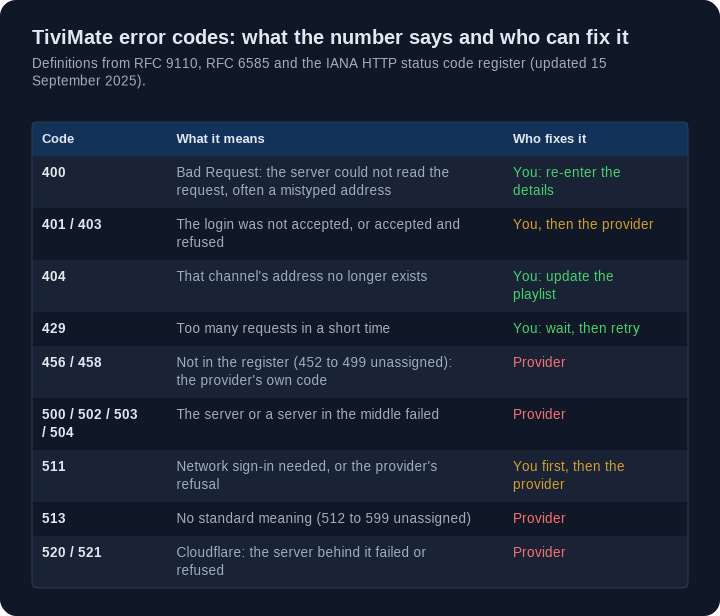
RFC 9110, the HTTP standard, says 400 Bad Request means “the server cannot or will not process the request due to something that is perceived to be a client error”, such as malformed request syntax. With TiviMate, the “client” is the app on your Fire TV Stick or Google TV box, and the usual cause is the address it was given. Look for a missing http://, a wrong port number, a space pasted at the end, or an M3U link cut short when it was copied. Re-enter the playlist details by hand. If code 400 tivimate searches brought you here after every channel failed at once, ask the provider whether the server address has changed.
Codes 401, 403 and 429: the login was refused
These three cover most login trouble. 401 means the server did not accept the username or password. 403 means it recognised the login and still refused it, for instance because the plan has ended, the account is blocked or too many devices are connected. 429 means too many requests in a short time, often after rapid channel changes. Our guide to fixing a refused TiviMate login works through each in order, along with 456.
Code 404: the channel address has gone
RFC 9110 says 404 means the server “did not find a current representation for the target resource”. For you, that one channel’s stream address no longer exists, usually because the provider renamed or moved it. Update the playlist from its settings so the app fetches the current addresses. If the channel is still missing, it has been dropped. A whole playlist returning 404 points to a changed server address.
Codes 456 and 458: the provider’s own codes
Neither number is in the IANA register of HTTP status codes, which lists 452 to 499 as unassigned. IPTV servers that send them use them for their own reasons, most often to refuse an account that has expired or has too many connections. Treat them like a 403, then ask the provider. Our page on what code 458 means and what to try sets out the checks.
Code 500 and the other 5xx codes: the server failed
RFC 9110 defines 500 Internal Server Error as a server that “encountered an unexpected condition that prevented it from fulfilling the request”. So code 500 tivimate reports are the provider’s fault, not your device’s. Its neighbours point the same way:
- 502 Bad Gateway: a server in the middle received an invalid answer from the one behind it.
- 503 Service Unavailable: the server is overloaded or down for maintenance, which the standard says will likely pass “after some delay”.
- 504 Gateway Timeout: a server in the middle got no answer in time.
These tend to arrive on many channels at once, often at busy times such as a Saturday 3pm kick-off. Try channels from two different groups. If they all fail, wait ten minutes and try again; reinstalling the app will not help.
Code 511: a network sign-in, or a provider refusal
511 is a real HTTP code, registered as Network Authentication Required in RFC 6585. It belongs to Wi-Fi networks that ask you to sign in, such as hotels and trains, but some IPTV servers send it as their own refusal too. Our guide to the 511 code in TiviMate shows how to tell which one you have.
Codes 513 and 551: not standard codes at all
We will be plain about this one: 513 has no standard meaning. The IANA register lists 512 to 599 as unassigned, so no web standard says what code 513 tivimate users see should mean. It is a number the provider’s server software chose. Because it begins with 5, it most likely signals a problem on the server side, but that is a guess, and any site that gives you a precise definition is guessing too. Note when it happens and on which channels, and send that to your provider.
The same goes for TiviMate 551. It sits in that unassigned 512 to 599 range, the developer publishes no list of codes, and we found no reliable source that defines it for TiviMate. TiviMate’s own error text simply reports “An error occurred” with the server’s message and code, so a code 551 is the provider’s server speaking, as with 456 and 458. If it appears on every channel, check the plan is still active and switch off any VPN, then send the provider the time, the channel and the full message.
Codes 520 and 521: Cloudflare in front of the server
These come from Cloudflare, a service some providers put in front of their servers, not from the HTTP standard. 521 means the server behind Cloudflare refused the connection. Our 511 guide explains what code 521 means in TiviMate; either way, only the provider can fix it.
Messages with words instead of a number
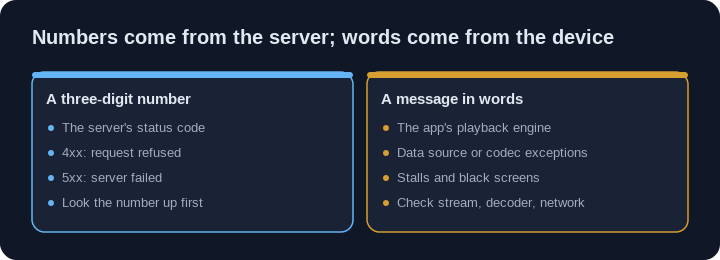
The long ones, such as HttpDataSourceException, come from the app’s playback engine and are covered in our guide to the TiviMate data source exception. If channels play but keep stopping, that is a stream arriving too slowly, so start with fixing TiviMate buffering. If the app will not open or loads no channels at all, work through what to check when TiviMate is not working.
What to send your provider
One message with these four details saves a lot of back and forth:
- The exact code or message, and a photo of the screen if you can.
- Which channels fail: one, one group, or all of them.
- When it started, and whether it happens all day or only at peak times.
- What you have already tried: re-entering the login, updating the playlist, turning off a VPN.
If your login comes from Tivimate, send those details to Ryan on WhatsApp and we will check the account and the server from our side. If you are still choosing a provider, Tivimate is an independent IPTV subscription for the UK, not the TiviMate app: you can test the service with the 24-hour Tivimate free trial, with no card, before looking at Tivimate plans from £15.
Frequently asked questions
How do you fix failed to get data from server in TiviMate?
That message means TiviMate could not load the playlist or the guide from your provider. Check the broadband in another app, then re-enter the server address, username and password exactly as sent, and update the playlist. If the same login fails in a second player too, the account has ended or the server address has changed, and only the provider can tell you which.
Is TiviMate down today?
TiviMate itself has no channels to go down: it plays your provider's stream. If several channels fail with a 5xx code at the same time, your provider's server is struggling. If the app will not open at all, that is a device or app fault. Our guide to TiviMate not working shows how to tell the two apart in two minutes.