Multiview is how people follow two football matches at once, or keep the news running beside a film. It is a listed TiviMate feature, but the developer says very little about it, and several numbers that circulate online could not be checked. This guide sets out what is confirmed, what multiview needs from your plan and your device, and how it differs from picture-in-picture. TiviMate is made by Armobsoft FZE; Tivimate, which runs this site, sells an IPTV subscription and is not the developer.
What multiview is
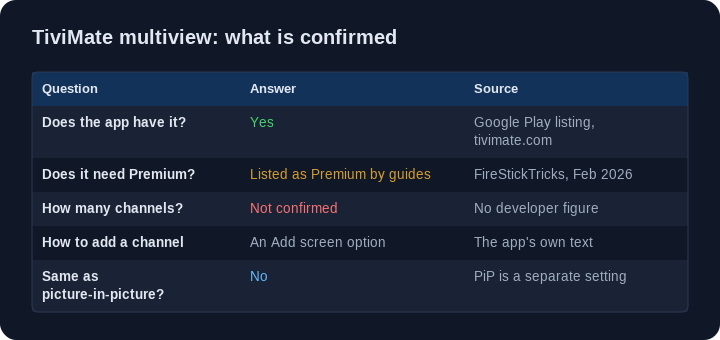
The Google Play listing puts it in one line: “Multiview: Watch multiple channels at once on a single screen”, and tivimate.com says “Watch different channels simultaneously on the same screen”. People search for the same thing as TiviMate split screen or multi screen. Inside the app, the English interface text includes options named “Add screen” and “Remove screen”, which appear to be how channels are added to and taken off the layout.
Does multiview need the paid upgrade?
Probably, but the developer does not say so in writing. Its listing names features without splitting them by tier, and the app’s own upgrade screen lists multiple playlists, catch-up, auto frame rate and more, ending “and much more”, without naming multiview. FireStickTricks, updated in February 2026, lists “View multiple channels simultaneously” under Premium, and the other guides we read agree. If the option shows a lock, that is the reason. Our guide to buying Premium in the UK covers where to pay on each device.
How to open multiview
The developer publishes no manual, so this is the general route used in common guides; your version may word it differently:
- Play a channel on a device where Premium is active.
- Open the options shown during playback. Several guides reach them with a long press of the select button.
- Choose multiview, then add a second channel from your list.
- Check both play smoothly before you add another. Remove a screen if playback starts to stutter.
How many channels it can show is not something we could confirm. The developer gives no number, and the figures quoted online do not cite a source. In practice your plan, your broadband and your device will set the limit before the app does.
Every channel uses a connection
This is the part that catches people out. An IPTV plan is sold with a limit on how many streams can run at once, and providers usually count streams, not televisions. Two channels in multiview on one TV look to the server like two TVs.
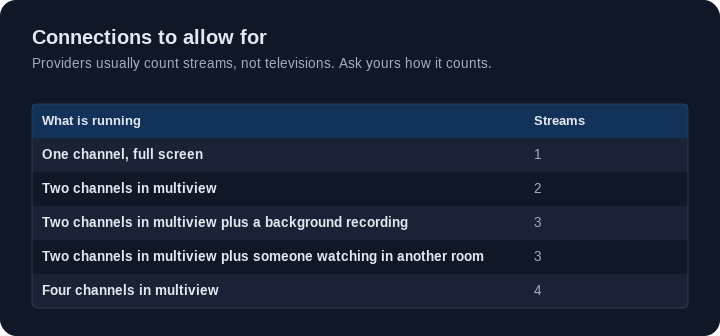
Go over the limit and the newest channel will usually fail, or an older one will drop. A recording running in the background counts too. Ask your provider how it counts if you are not sure.
Keeping several channels smooth
- Start with two. Add one channel at a time and stop when playback stutters. That is your practical limit.
- Use a cable if you can. Several streams at once lean harder on a weak Wi-Fi link than one does.
- Pick HD over 4K. A channel in a corner of the screen gains little from 4K, and a smaller stream needs less bandwidth.
- Close other apps on a Fire TV Stick, where memory is limited.
If one channel stalls on its own too, multiview is not the cause; work through our TiviMate buffering fixes. If a number appears, check our list of TiviMate error codes.
Multiview on a Fire TV Stick or a Google TV box
The developer names no devices for multiview, and we have tested none, so treat the following as reasoning rather than results. Every channel on screen is a separate video that the device has to fetch and decode at the same time. A small stick plugged into the back of a TV has less processing power and memory to share than a larger box, and it often sits further from the router. So on a Fire TV Stick, two channels in HD is a sensible first test; on a Google TV Streamer or an NVIDIA Shield on a wired connection, you may get further. Whatever you own, the honest limit is the one you find by adding channels one at a time.
Multiview also asks more of the provider. Each extra channel is one more stream from their server at peak time, so a plan that copes with one channel on a Saturday afternoon may still struggle with four. If the newest channel will not start but the others carry on, that is usually the connection limit rather than the device.
When multiview will not behave: causes and fixes
| What you see | Likely cause | What to do |
|---|---|---|
| The option is missing or shows a lock | Premium is not active on this device | Activation is per device; check the Premium section of settings on this TV |
| The second channel will not start; the first plays on | Your plan’s connection limit | Stop a recording or another TV, or use a plan with more devices |
| Every channel stutters once you add one | Broadband, Wi-Fi or the device’s processing | Remove a screen, choose HD versions, move to a cable |
| One window stays black | That channel’s stream | Play it alone; if it fails there too, it is the channel, not multiview |
| An option in the menu has a different name | A different app version | Look for Add screen and Remove screen, the app’s own wording |
Two people who want different channels in different rooms are better served by two devices than by multiview on one screen. The connection count is the same either way, and each person keeps a full-size picture and their own remote.
TiviMate PiP is a different feature
Picture-in-picture, or PiP, keeps one channel playing in a small window while you use something else. The app has a setting described as “Switch to picture-in-picture mode on press Home”: press Home on the remote and the channel shrinks into a corner instead of stopping. It needs a device whose system supports it, and it shows one channel, not several. So TiviMate PiP suits glancing at a match while you browse another app; multiview suits watching two channels inside TiviMate. Other options worth a look are in our guide to the settings worth changing first.
Multiview and your plan
Tivimate is an independent IPTV subscription for the UK, not the TiviMate app. Every plan is sold for one to four devices at once. Expect each channel in multiview to use one of those, and ask Ryan on WhatsApp if you are not sure how many you need. Try the service with the free 24-hour Tivimate trial, no card needed, and choose the number of devices on the plans page, from £15.
Frequently asked questions
Does TiviMate have multiview?
Yes. The developer's Google Play listing names it: "Multiview: Watch multiple channels at once on a single screen", and tivimate.com lists it among the app's features. Independent guides list it under Premium, so expect to need the upgrade, and check for a lock on the option in your copy.
How do you use TiviMate Premium features such as multiview?
Once Premium is active on the device, the locked options open. For multiview, play a channel, open the options shown during playback, choose multiview and add a second channel. Menu wording can change between versions, so look for the nearest match. Add channels one at a time and check each plays before adding another.