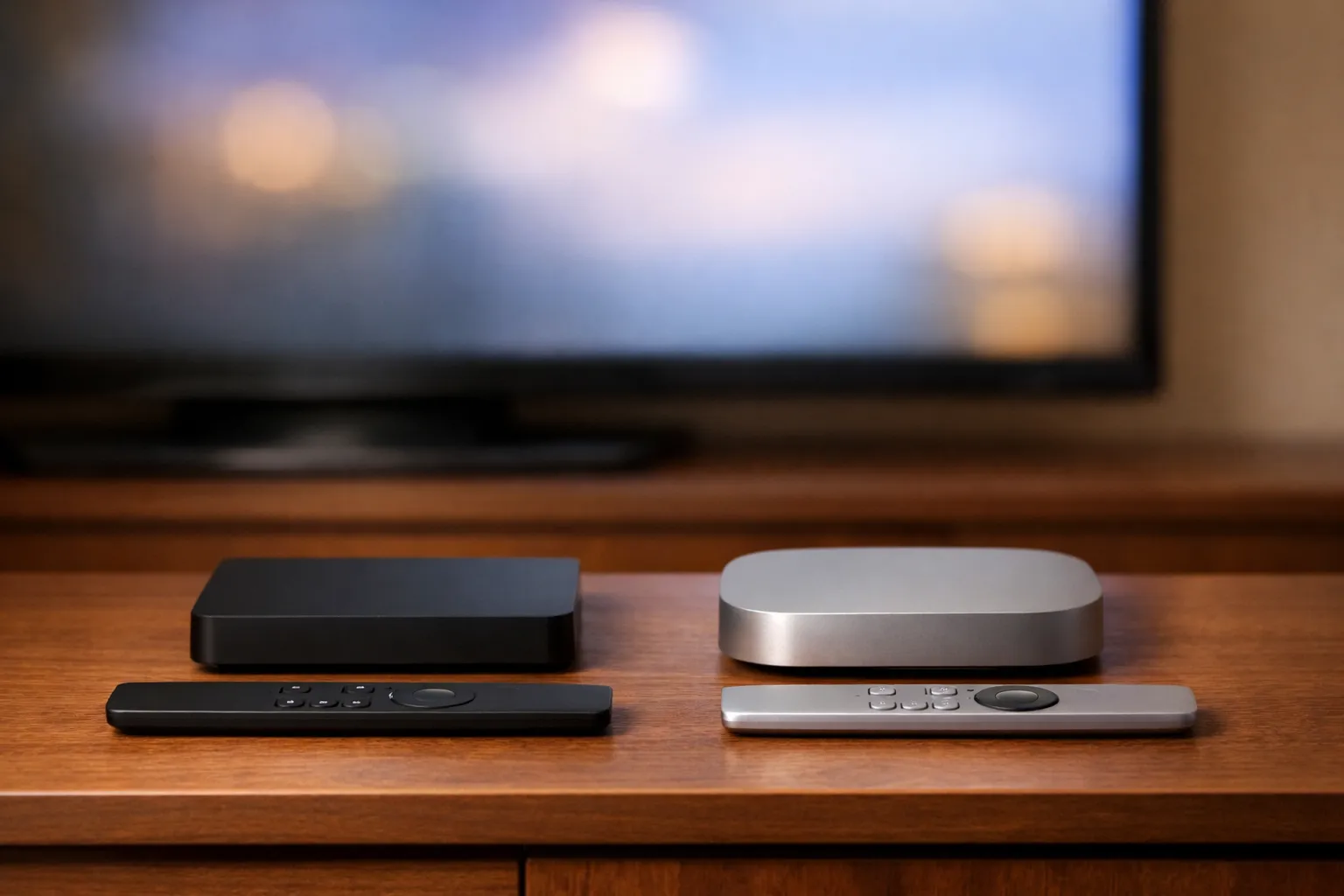
TiviMate and UHF are often mentioned in the same breath, but they rarely compete for the same screen: one is built for Android TV boxes and the other for Apple devices. This comparison sets them side by side using only what each developer publishes, read on 27 November 2026. We have not tested either app, there is no winner here, and the numbers are the developers’ own. Tivimate, which runs this site, is an independent IPTV subscription; we make neither app and are affiliated with neither developer.
Platforms: Android TV on one side, Apple on the other
TiviMate is published by Armobsoft FZE. Its Google Play listing says it “is designed for Android TV and remote control navigation”, and tivimate.com offers it two ways: Google Play, for Google TV and Android TV devices, and its own file through Downloader code 272483, for Fire TV devices on Fire OS. There is nothing from the developer on the App Store.
UHF is published by Short Wavelength Applications SL. Its UK App Store listing covers iPhone and iPad on iOS or iPadOS 16.0 or later, Apple TV on tvOS 17.0 or later, Macs with an Apple M1 chip or later on macOS 13.0 or later, and Apple Vision. The developer’s own site says it “runs on everything Apple makes” and names no Android version.
So for most households the choice is made before any feature is read. Our guide to Apple TV players in place of TiviMate puts UHF beside three other tvOS apps, and TiviMate on iPhone and Android phones explains why there is no iPhone version.
Side by side, from each developer’s listing
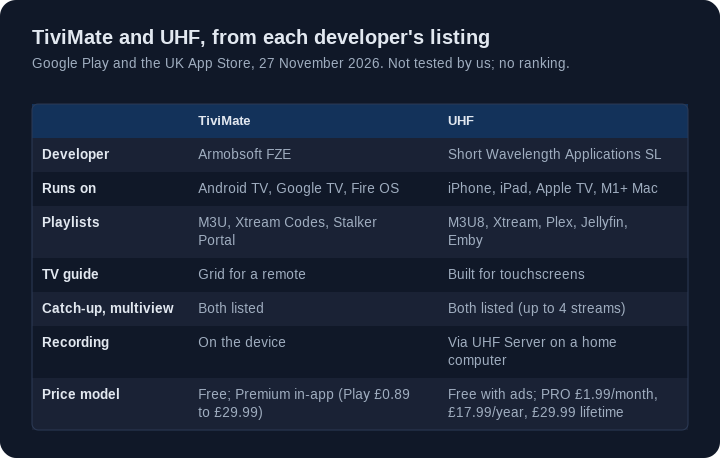
Read the table as a list of what each developer says its app does, not as a score. Features that sound alike can work quite differently, and the next sections pick out where they do.
Playlists and logins
Both take the two common login types: Xtream Codes, which is a server address, username and password, and an M3U link (UHF’s listing says M3U8). TiviMate adds Stalker Portal, a portal address tied to the device’s MAC address; UHF does not list it. UHF instead adds Plex, Jellyfin and Emby, which are media servers you run at home for your own files. If your provider gave you a portal address only, ask for Xtream Codes details before trying UHF. Our guide to the three TiviMate playlist types explains each.
TV guide, catch-up and multiview
TiviMate’s listing describes its TV guide as a “fast, clear grid”, the classic set-top box layout read with a remote. UHF says it designed its guide “from scratch” for touchscreens, so swiping through schedules suits an iPhone or iPad; its paid plan adds an unlimited guide range and alerts.
Both list catch-up, which also depends on your provider offering it for the channel. Both offer several channels on one screen: TiviMate calls it multiview, and UHF’s listing says its Multi-views show up to four streams at once. Each stream is a separate connection on your plan, so check how many your provider allows. On TiviMate, independent guides list catch-up and multiview as Premium features; our TiviMate multiview guide explains the connection point in full.
Recording: on the device or on a home server
This is the clearest technical difference. TiviMate records on the device it runs on, to its own storage or a drive it can write to, as set out in our guide to recording on TiviMate. UHF records through UHF Server, which its listing describes as a free companion app you run on a Mac, Windows or Linux computer on your home network, with recordings scheduled from your phone. That suits a household with a computer left on; TiviMate’s way needs no second machine. UHF also lists downloads for offline viewing and casting with AirPlay and Chromecast.
Favourites, renaming and parental locks
A large playlist is only usable once it is trimmed to the channels you watch. TiviMate’s listing names favourite channels, search and parental controls, and it lets you hide whole groups, as shown in our guide to hiding and unhiding channels in TiviMate. UHF’s listing names favourites, renaming channels, reordering categories and locking folders behind a PIN code. Both cover the basic job of hiding what children should not reach; UHF’s renaming is useful when a provider’s channel names are long or inconsistent.
Setting up more than one screen
The two apps solve this differently. In UHF, sync across devices is part of the PRO plan: the listing says your playlists, recent views and favourites update on every Apple device signed in, so you set up once on an iPhone and the Apple TV follows. TiviMate has no sync between devices in its listing. Instead you save a backup on one box and restore it on the next, as set out in our guide to moving TiviMate to a new device; Premium then needs a free place on its device list.
Neither app carries favourites to the other, because each stores them in its own format. A mixed household sets up each app once, with the same provider login.
What each costs in the UK
- TiviMate: free to install, with Premium as an in-app upgrade. The developer’s terms describe a one-time lifetime purchase and auto-renewing subscriptions, and Google Play in the UK shows in-app items from £0.89 to £29.99. The exact Premium price shows on the purchase screen, and it covers up to five devices. Our TiviMate Premium guide has the detail.
- UHF: free to install, and the listing says it contains advertising. Its PRO plan, which removes ads and watermarks and adds sync across devices, is listed on the UK App Store at £1.99 a month, £17.99 a year or £29.99 for lifetime.
The line between free and paid can move with an update. UHF’s notes for version 2.10.0 say that going to a channel from an event, and subtitle search through OpenSubtitles.com, are now PRO features. TiviMate’s split is not published by the developer at all, so in both apps the purchase screen is the place to check what you would get.
Neither price includes channels. Those come from your provider, at a separate cost.
Which one fits your home
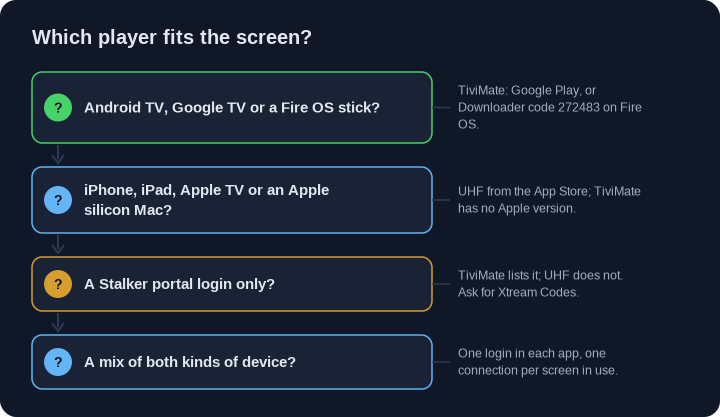
If your household mixes an Android TV box in the lounge with iPhones and an Apple TV elsewhere, you do not have to choose: the same Xtream Codes login can go into TiviMate on one and UHF on the other, as long as your plan has a connection for each screen in use. For other platforms, our players by device, from Samsung TVs to Windows and the IPTV Smarters Pro and TiviMate comparison cover the rest.
Both apps need a playlist to show anything. Tivimate sends an Xtream Codes login, the type both developers list, and you can test it in either app with the free 24-hour Tivimate trial, no card needed, or see plans from £15.
Frequently asked questions
Is UHF the same as TiviMate?
No. They are separate apps from separate companies. TiviMate is made by Armobsoft FZE for Android TV devices; UHF is made by Short Wavelength Applications SL for Apple devices. Both are players that load a playlist from your provider, and neither includes channels.
Can you get UHF on a Fire TV Stick?
Not from its developer. Short Wavelength Applications SL publishes UHF on the App Store, and its website names only Apple platforms: iPhone, iPad, Apple TV and Mac. On a Fire TV Stick running Fire OS, TiviMate is the one of the two that installs, through the developer's Downloader code 272483.
Does the same IPTV login work in both?
Usually, yes. Both list Xtream Codes and M3U playlists, so the details your provider sent for TiviMate can be typed into UHF on an Apple device. A Stalker portal login is the exception: TiviMate lists it, and UHF's listing does not. Each stream you watch uses one of your plan's connections, whichever app plays it.