Is TiviMate on Apple TV? No, and nothing you can install changes that. Its developer, Armobsoft FZE, publishes TiviMate for Android, on Google Play and as its own file for Fire TV, and nothing else. If you own an Apple TV, you have two real choices: a player built for tvOS, or a cheap Android device on another HDMI port. This guide covers both, using each developer’s own App Store listing. Tivimate, which runs this site, sells an IPTV subscription and is not the developer of TiviMate or of any app below.
Why there is no Apple TV version
Apps for Apple TV must be built for tvOS and sold through the App Store. We searched the UK App Store on 27 November 2026, by app name and by developer name, and found no app from Armobsoft FZE. What the search does return is a set of lookalikes from other sellers, with names such as “Tivimate - IPTV & M3U Player” and “TiviMato Player Pro”. They are not TiviMate, and the real developer does not support them. Judge them as you would any unknown app, and do not expect them to work like the Android original. The same goes for every model, the Apple TV 4K included: there is no TiviMate for any of them.
Players for Apple TV, from their own listings
Every IPTV player for Apple TV does the same basic job as TiviMate: it loads the login from your provider and plays the channels. Where they differ is the guide, catch-up and price. The table lists four that run on Apple TV, with what their UK App Store pages say. It is not a ranking, and we did not test them.
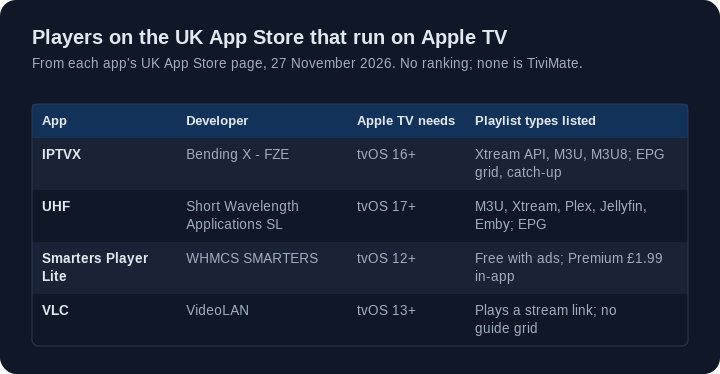
- IPTVX by Bending X - FZE lists Xtream API, M3U and M3U8 playlists, an EPG grid and TV archive or catch-up, and needs tvOS 16.0 or later. It is free with ads, with in-app purchases.
- UHF by Short Wavelength Applications SL lists M3U, Xtream, Plex, Jellyfin and Emby sources and a rebuilt EPG, and needs tvOS 17.0 or later. It has in-app purchases. Our TiviMate vs UHF comparison sets the two side by side.
- Smarters Player Lite by WHMCS SMARTERS runs on iPhone, iPad and Apple TV with tvOS 12.0 or later. It contains ads, and its listing shows a Premium upgrade at £1.99.
- VLC by VideoLAN is free and needs tvOS 13.0 or later. It plays a stream or playlist link but has no TV guide grid, so it suits a quick test more than nightly viewing.
Check the developer name on any listing before installing, and check the playlist types it names match what your provider sent. The wider list, for every kind of device, is in our guide to TiviMate alternatives by device.
Setting up a player on Apple TV
- Check your tvOS version. The listings above set minimums from tvOS 12.0 to tvOS 17.0. The version your Apple TV runs is shown in its Settings, in the About screen; update it there first if a listing asks for more.
- Find the app on the Apple TV’s App Store, open its page and check the seller line matches the developer named above. Several lookalikes use similar icons.
- Read the in-app purchases section before you choose Get. A free download may put the guide or more playlists behind a purchase.
- Open the app and choose the login type that matches what your provider sent: Xtream Codes (sometimes labelled Xtream API) or an M3U link.
- Type the details with your iPhone, as described below, then let the channel list and guide load before you judge the app.
Typing a long login with your iPhone
Server addresses and M3U links are painful on the Siri Remote. Apple’s Apple TV User Guide describes the shortcut: when a text field appears on the Apple TV, a notification appears on a nearby iPhone or iPad, and you tap it to type with the phone’s keyboard. Both devices must be signed in with the same Apple Account, with Bluetooth and Wi-Fi on. That also means you can paste the login straight from your provider’s message, which removes the usual typing mistakes. If the notification never appears, check it has not been turned off under Settings, Notifications, Apple TV Keyboard on the iPhone.
Moving your playlist across
Your login is the part that matters, and it is not tied to TiviMate. Enter the same Xtream Codes server address, username and password, or the same M3U link, in the Apple TV player. What does not move is everything you set up inside TiviMate: favourites, hidden groups and settings live in TiviMate’s own backup file, which only TiviMate can read. If you are unsure which details your provider gave you, our guide to the three playlist types explains each.
One point on connections: if you watch on the Apple TV and on another device at once, each stream uses one of the connections on your plan.
If the player will not load your login
- Refused at once: a typing error in the server, username or password, or an ended plan. Paste the details from the message rather than retyping them.
- The player has no Xtream Codes option: ask your provider for the M3U link for the same account and use that instead.
- Channels but no guide: with an M3U link, the player may want the guide address entered separately, or keep the guide behind an in-app purchase.
- Plays, then stops when someone else is watching: you have reached your plan’s number of connections.
A login refused with a number is the server answering, not the Apple TV, so the same number means the same thing in any player.
Or keep TiviMate with an Android device
If it is TiviMate itself you want, an Android TV device on a spare HDMI port is the way to get it. A Google TV Streamer or a Fire OS stick such as the Fire TV Stick 4K Max both run it; Amazon’s newer Vega OS sticks do not. The Apple TV stays where it is for everything else. Our TiviMate device compatibility table lists which models run it, with a source for each, and our guide to choosing a device for TiviMate sets out the trade-offs.
iPhone and iPad are the same story
iPhones and iPads use the same App Store, so the answer there is the same: no app from the developer, and a different player instead. Several of the apps above also run on iPhone and iPad. Our guide to TiviMate on iPhone and Android phones covers phones and tablets in detail, including the Companion app that Android phones use to buy Premium.
Whatever player you settle on, the channels come from your provider. Tivimate is an independent IPTV subscription for the UK, and its Xtream Codes login works in TiviMate and in Apple TV players that support Xtream Codes. Test it on your Apple TV player with Tivimate’s 24-hour trial, no card needed, or see plans from £15.
Frequently asked questions
Is TiviMate on Apple TV?
No. TiviMate is published by Armobsoft FZE for Android only, and a search of the UK App Store on 27 November 2026 found no app from that developer. Apps with similar names on the App Store come from other sellers and are not TiviMate. On Apple TV you need a different player that loads the same IPTV login.
Does TiviMate work on iPhone?
No. There is no iPhone or iPad version, for the same reason as Apple TV: the developer publishes nothing on the App Store. Your IPTV login still works in an iPhone player that supports Xtream Codes or M3U, and several of the Apple TV players above also run on iPhone and iPad.