A lot of people look for TiviMate on the phone in their pocket, and the honest answer depends on which phone it is. This guide sets out what the developer actually publishes for each platform, as read on 27 November 2026, and what to use where TiviMate does not exist. TiviMate is made by Armobsoft FZE. Tivimate, the company behind this site, sells an IPTV subscription; we are not the app’s developer, and none of the App Store apps with TiviMate-like names are ours.
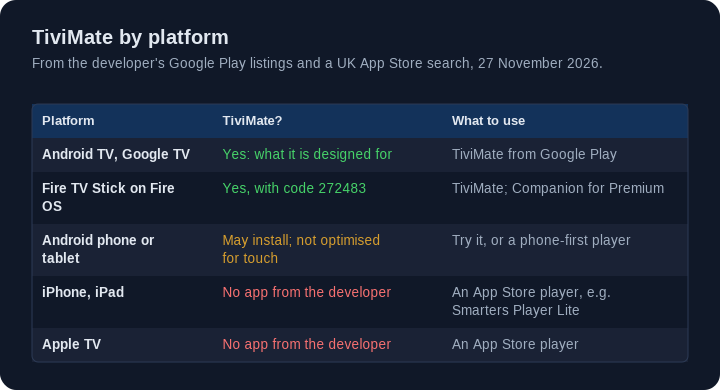
Where TiviMate runs, and where it does not
The Google Play listing is the developer’s own statement: TiviMate “is designed for Android TV and remote control navigation. It is not optimized for touch devices such as phones or tablets.” Everything else follows from that sentence.
Is there TiviMate for iPhone or iPad?
No, and so TiviMate does not work on iPhone in any form. We searched the UK App Store for TiviMate, for the Companion app and for the developer’s name, and found no app from Armobsoft FZE. What the search does show is lookalikes: apps such as “Tivimate - IPTV & M3U Player” and “TiviMato Player Pro”, published by other sellers. They may be perfectly usable players, but they are not TiviMate, and their settings, features and support have nothing to do with it. Check the seller’s name before you install anything with a familiar icon.
Do not chase a workaround. Websites offering a TiviMate iPhone download, a configuration profile or an “iOS version” are not the developer, and a profile or a payment request is a reason to stop. So, can you get TiviMate on iPhone? Not in any genuine form.
What to use on an iPhone or iPad instead
Your login is not tied to one app, so on an iPhone you lose TiviMate’s menus, not your channels. Two App Store players as listed in the UK on 27 November 2026:
- Smarters Player Lite, from WHMCS SMARTERS, free. Its listing names M3U and JSON playlists, and the IPTV Smarters download page points iPhone, iPad and Apple TV users to it.
- GSE SMART IPTV PRO, from GSE TECHNOLOGY LTD, £2.99 for iPhone and iPad.
Check which login types each listing accepts against what your provider sends. Our guide to TiviMate alternatives by device compares more players, and IPTV Smarters Pro vs TiviMate sets those two side by side. If you also have an Apple TV, our guide to Apple TV players instead of TiviMate covers the big screen.
Which login to enter in a phone player
Your provider’s login usually comes in more than one form, and phone players do not all accept the same ones. Read the listing before you type anything. A player that names Xtream Codes, sometimes written Xtream API, takes the same three fields, server address first, exactly as you would enter them in TiviMate. A player that lists only M3U needs the M3U link for the same account, so ask your provider for it if they sent only the three fields: it is the same subscription in another format, not a second login. Smarters Player Lite’s listing, for example, names M3U and JSON playlists.
Whichever format you use, it still counts against the same connection limit as your TV, covered below. And if the guide is blank in the phone player but fine in TiviMate, the player may need the guide address entered separately, as M3U playlists sometimes do in TiviMate too.
Android phones and tablets
Here the answer is “maybe”. The listing does not say TiviMate refuses to run on a phone; it says it was not built for touch. Google Play decides what it offers for your particular device. If you want to try, this is how to download TiviMate on Android:
- Open the Play Store on the phone or tablet and search for TiviMate IPTV Player.
- Check the developer reads Armobsoft FZE. If the app is not offered for your device, stop there.
- Install it and add your playlist; our playlist guide covers each login type.
- Give it a few minutes. Can you reach the guide and the menus comfortably by touch? If not, keep the login and use a player designed for phones.
A TiviMate Android tablet install works the same way, and the bigger screen may make the TV-style guide easier to read, but it is still built for a remote rather than a finger. That is the only honest way to get TiviMate on an Android phone. Ignore sites offering a “mobile version” or a file with extras unlocked: those are modified copies, and we do not link to them.
Using the app by touch
If Google Play does offer TiviMate for your phone, it helps to know what “not optimized for touch” means in practice before you judge it. The screens are the TV screens: a channel list, a guide grid and menus that expect a direction pad. A tap selects, much as the remote’s select button would, and the phone’s Back gesture goes back. What feels clumsy is the reach: small targets at the edge of the guide, and long lists built for scrolling with a button. A tablet in landscape is noticeably better than a phone held upright. A Bluetooth keyboard or a game controller with a direction pad turns it back into the remote-driven app it was designed as.
What a phone is useful for: Companion
Is there a TiviMate phone app, then? Not as a player. The developer makes one app for phones, and it does a different job. One job really does need a phone. TiviMate Companion is a separate Android app from the same developer for buying and managing Premium for devices without Google Play, such as a Fire TV Stick. Its listing says, in capitals, that “It is not IPTV player app!”, so it will not play channels. It is Android-only; there is no App Store version, so an iPhone owner needs to borrow an Android phone for the purchase, or run Companion in an Android emulator on a computer, which tivimate.com also names as a route. Our TiviMate Companion guide walks through it.
Watching on a phone uses a connection
A stream on a phone counts like a stream on a TV. If your plan allows one device at a time, watching on the phone while the TV plays can push you over the limit and stop one of them. On mobile data, keep an eye on your allowance, because live video uses a lot of it.
If you want TiviMate itself, the best place for it is the TV: our guide to the devices that run TiviMate lists them. Tivimate, the IPTV service sold on this site, is a separate thing from the app: its Xtream Codes login works in TiviMate on the TV and in a compatible player on your iPhone, with plans for one to four devices at once. Try both screens with the free 24-hour Tivimate trial, no card needed, or see plans from £15.
Frequently asked questions
Can you get TiviMate on iPhone?
No. Its developer, Armobsoft FZE, has no app on the UK App Store, and the TiviMate listing on Google Play describes an app designed for Android TV. Apps on the App Store with similar names come from other sellers. On an iPhone, use an App Store player that accepts your provider's login instead.
How do you install TiviMate on an iPad?
You cannot, for the same reason as the iPhone: there is no iPadOS version from the developer, and nothing in the App Store under its name. An iPad can still play your IPTV login in an App Store player, and if you want TiviMate's interface, it runs on an Android TV device or a Fire OS stick plugged into the TV.
Does TiviMate work on an Android phone?
It may install, if Google Play offers it for your phone, but its listing warns it is not optimized for touch devices such as phones or tablets. Expect a layout made for a remote on a big screen. If it is awkward to use, keep your login and pick a player built for phones.
How do you use TiviMate on an Android phone?
Turn the phone sideways, since the layout is built for a landscape TV screen, and tap where a remote would select. Your phone's Back gesture or button stands in for the remote's Back. A Bluetooth keyboard or game controller with a direction pad makes it behave much more like it does on a TV.