Search for TiviMate in the UK and you will find an app, a dozen lookalikes and at least one company with nearly the same name, which is us. So, first things first: TiviMate is an app made by Armobsoft FZE, and Tivimate, the company behind this site, is an independent IPTV subscription. We are not the developer, we are not affiliated with Armobsoft FZE, and nothing on this page speaks for them. What follows describes the app from its developer’s own words, on its Google Play listing, its website and its interface, as read on 27 November 2026.
The TiviMate application in one paragraph
The developer’s Google Play listing calls TiviMate a player for “your playlists” and says it “is designed for Android TV and remote control navigation”. In plain terms, it is the screen you scroll through with a TV remote: a list of channels down one side, a programme guide laid out as a grid, and the picture itself. The listing’s key features are support for M3U, Xtream Codes and Stalker Portal playlists, the TV guide, several playlists at once, favourite channels, catch-up, recording, search, parental controls and multiview, which puts several channels on one screen.
If you have asked “TiviMate, what is it, really?”, the closest everyday comparison is a set-top box’s menu without the set-top box. It organises channels well. It does not supply them.
Why it comes with no channels
This is the point people most often miss. The listing says TiviMate “is a media player only and does not provide any content”, and the developer’s terms of use repeat it: “It does not provide, host, or distribute any content.” Even the paid upgrade, in the listing’s words, “unlocks application features only”. Open the app for the first time and it asks for a playlist, because without one there is nothing to show.
The channels come from an IPTV provider, who sends you a login. The app and the provider are separate businesses with separate support. If a channel will not play, the provider can usually tell you why; if the app crashes, that is a question for the developer at support@tivimate.com.
How does TiviMate work?
Four parts, in order. The provider runs the server. You receive a login. TiviMate reads it on your device. The picture appears on your television.
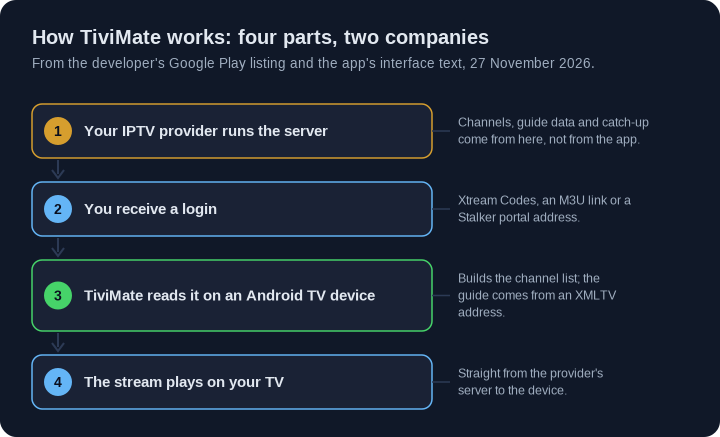
The login comes in one of three forms: Xtream Codes (a server address, username and password), an M3U link, or a Stalker portal address tied to your device’s MAC address. With Xtream Codes the guide normally arrives with the channels; with an M3U link you may need to add the guide address yourself, and the app is specific that the guide must be in XMLTV format. Our guide to adding a playlist to TiviMate covers each form, and the step-by-step TiviMate setup takes you from installing the app to your first channel in the right order.
Free to install, Premium to unlock more
The app costs nothing to install and plays one playlist with its TV guide. Premium is an optional upgrade bought inside it. The app’s own upgrade screen lists what you get: “Support for multiple playlists”, “Favorites management”, “Catch-up”, “Customizable EPG update intervals”, “Manual channels sorting”, “Auto frame rate (AFR)” “and much more”. It covers up to five devices.
The developer’s terms describe “a one-time lifetime purchase and one or more auto-renewing subscriptions”. Google Play in the UK shows in-app items from £0.89 to £29.99 when billed through Play, which is a range across items rather than one Premium price. Our page on what the free version does and what you pay for sets out the split, and TiviMate Premium in the UK covers where to buy it, including on a Fire TV Stick.
Which devices it runs on
Only Android ones. tivimate.com offers two routes: Google Play, for Google TV and Android TV devices such as the Google TV Streamer, NVIDIA Shield and Sony or TCL televisions; and its own file through the Downloader app with code 272483, for Fire TV devices running Fire OS, such as the Fire TV Stick 4K Max and Fire TV Cube. Amazon’s newer sticks on Vega OS cannot install it.
There is no version for iPhone, iPad, Apple TV, Samsung or LG televisions, Roku or Windows. Android phones and tablets may install it, but the listing warns it “is not optimized for touch devices such as phones or tablets”. Model by model, with a source for every row, our table of UK devices that run TiviMate is the quickest check. For Apple devices, the comparison of TiviMate and UHF looks at one player made for them.
Who makes what: the app, the provider and this site
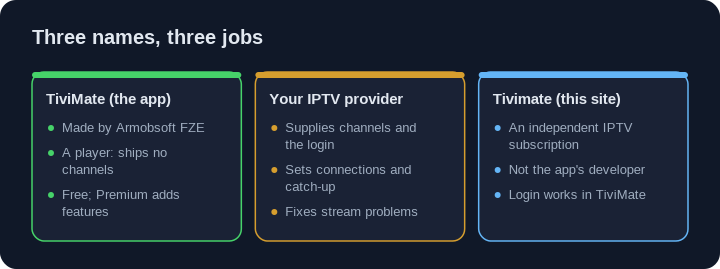
Three names, three jobs. Armobsoft FZE makes and supports the app. Your IPTV provider supplies the channels and the login. Tivimate is one such provider for the UK: an independent IPTV subscription whose Xtream Codes login works in TiviMate and in most other players. We do not make the TiviMate app, we cannot sell or fix TiviMate Premium, and the similar name is a coincidence that causes real confusion, which is why every page here says so.
Getting started
Install the app from Google Play or, on a Fire TV Stick, with the developer’s Downloader code, then add a playlist. If you do not have one yet, you can try ours: the 24-hour Tivimate trial needs no card and arrives on WhatsApp, and plans start at £15 a month. Whatever you choose, the app stays the same: a player, and only as good as the playlist you give it.
Frequently asked questions
What is TiviMate?
TiviMate is a player app for Android TV devices, made by Armobsoft FZE. It takes a playlist from an IPTV provider and shows those channels in a list and a TV guide grid, with favourites, search and parental controls. It comes with no channels of its own: until you add a playlist, it has nothing to play.
How does TiviMate work?
You give it a login from your provider: Xtream Codes details, an M3U link or a Stalker portal address. TiviMate reads the channel list from that login and the programme listings from a guide address in XMLTV format, then builds its channel list and TV guide. When you pick a channel, the stream comes from the provider's server straight to your device.
Do you have to pay for TiviMate?
Not to start. The app is free to install from Google Play or the developer's own download and plays one playlist with its TV guide. Premium is an optional paid upgrade for extra features. Channels are a separate cost in every case, because they come from your IPTV provider, not from the app.
Do I need TiviMate Premium?
Only if you want what it adds. The app's own upgrade screen lists more than one playlist, favourites management, catch-up, custom guide update intervals, manual channel sorting and auto frame rate, among others. If you watch one playlist and the guide is enough, the free app does the job.
Does TiviMate have catch-up?
Yes. The developer's Google Play listing names catch-up as a feature, and the app's upgrade screen lists it under Premium. It also needs your provider to offer catch-up on the channel, because the past programmes come from the provider's server, not from TiviMate.
Is TiviMate Pro the same as TiviMate?
No. Armobsoft FZE publishes one app, TiviMate, with Premium as its paid upgrade. Apps or files sold as TiviMate Pro do not come from that developer. If you want the extra features, buy Premium inside the real app.